For most teams, Formable's contract creator is the strongest pick among online contract creation tools. It combines AI-assisted drafting, collaborative redlining, and e-signing into one workflow, so you can move from a blank template to a signed MSA or SOW without switching platforms.
- AI drafting and templates: Formable generates contracts from pre-built templates using generative AI, supports NDAs, DPAs, SOWs, LOIs, Order Forms, and more, and offers a standalone e-signing API for teams that need to embed signing into their own platforms.
- Security and onboarding: Formable supports ESIGN/UETA-compliant e-signatures for U.S. enforceability and is built for fast onboarding, with small teams able to send their first contract within a day of setup.
Try the free tier at Formable's contract creator to test AI drafting with your own template before committing to a paid plan.
Pro Tip: Before your trial, export one of your most-used contracts as a plain text file. Uploading a real template on day one gives you a meaningful benchmark for drafting speed and clause accuracy.
What features should you expect from online contract creation tools?
The best contract drafting software does more than generate a PDF. Here is what to look for before you commit to any platform.
Core feature checklist
- Template library: Pre-built templates for common agreement types (NDA, MSA, SOW, DPA) reduce drafting time. Template-based services let individuals create customized contracts relatively quickly for routine agreements.
- AI-assisted drafting: AI generators can produce a tailored first draft rapidly, cutting the blank-page problem entirely.
- Clause and playbook libraries: Pre-approved clause sets reduce errors and speed approvals, especially at scale. Enterprise platforms use reusable playbooks and clause libraries to pre-populate drafts and cut review cycles.
- Redlining and collaborative editing: Both parties need to mark up, accept, and reject changes in a shared environment before signing.
- E-signature: Look for ESIGN and UETA compliance for U.S. contracts. Standalone e-sign and API-based signing are both worth evaluating depending on your workflow.
- Audit trail and version history: Every change, timestamp, and signing event should be logged and immutable.
- Metadata and search: Contracts need to be findable by counterparty, date, type, and status.
Integration and security requirements
CRM, cloud storage, billing, and identity verification integrations drive adoption for sales and operations teams. A contract tool that sits outside your existing tech stack tends to get bypassed. On the security side, look for encryption at rest and in transit, SOC 2 certification or equivalent, granular access controls, and audit logs that satisfy regulatory inquiries.

Pro Tip: During a trial, test the integration your team uses most, whether that is Salesforce, HubSpot, or Google Drive. If the connection requires a developer to configure, factor that setup time into your evaluation.

How do you choose the right contract creation tool for your team?
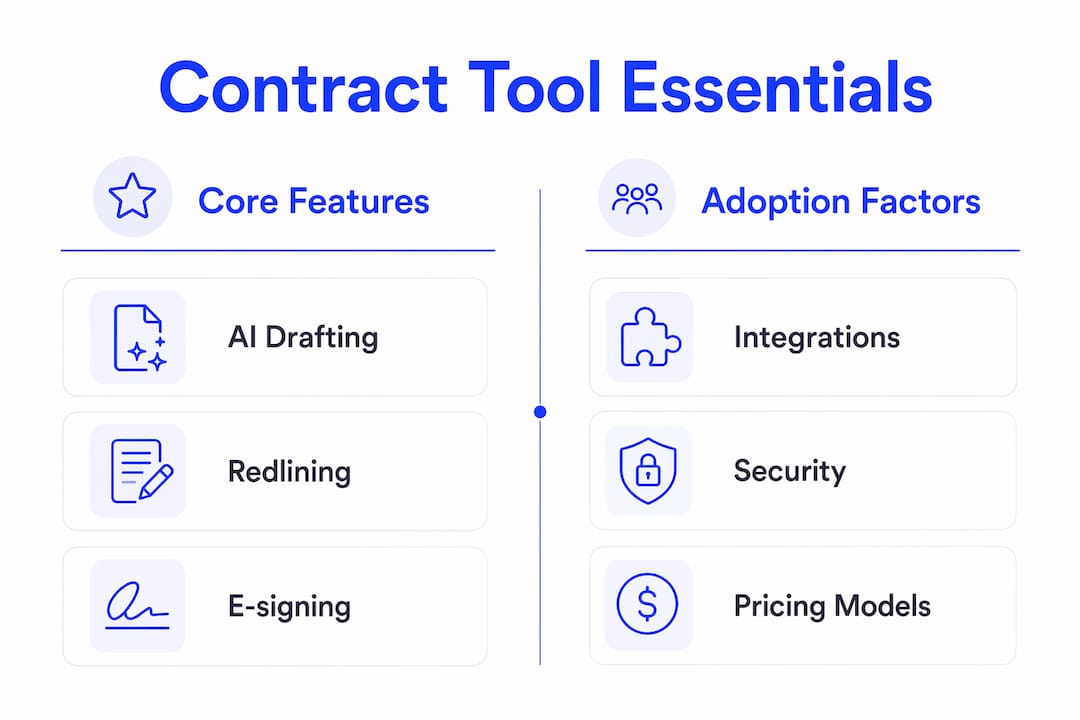
Usability and ecosystem fit predict long-term adoption more reliably than a long feature list. A tool with 50 features that nobody uses is worse than a focused one your team opens every day. Here is a practical process.
A one-week trial plan for small teams
- Day 1: Define your two or three most common agreement types (e.g., NDA, SOW, vendor MSA). Import or recreate one as a template in the tool.
- Day 2: Generate a draft using AI or guided questionnaires. Measure time from blank to first draft.
- Day 3: Send the draft to a colleague for redlining. Note how long it takes to resolve one round of comments.
- Day 4: Test the integration with your CRM or storage tool. Confirm that signed documents land where your team expects them.
- Day 5: Send a test contract for e-signature. Verify the audit trail captures each signing event with a timestamp.
Questions to ask vendors before you buy
- Where is contract data stored, and is it encrypted at rest and in transit?
- Does the platform support ESIGN and UETA for U.S. enforceability?
- What are the API rate limits, and how is API-based e-signing priced?
- Can you upload a custom playbook or clause library on day one?
- How are redlines handled when a counterparty does not use the platform?
Pricing models to understand
Free tiers are useful for individuals and developers testing API access. Per-user subscription pricing suits small teams with predictable volume. Usage-based pricing for e-signing and API calls fits teams with variable contract volume. Watch for hidden costs on template customization, redlining features, and third-party integrations. Hybrid models that bundle guided drafting with optional attorney review, like those offered by some legal platforms, add cost predictability but may not fit teams that need high-volume automation.
How Formable meets the evaluation criteria
Formable maps directly to the checklist above. Here is how each capability lines up.
- Templates and AI drafting: Formable's contract creator combines pre-built templates with generative AI, covering MSAs, DPAs, SOWs, LOIs, NDAs, Order Forms, and Pilot Agreements.
- Redlining and negotiation: Formable's redlining tool lets both parties align on terms in a shared environment before the contract reaches the signing stage.
- E-sign and API: Formable operates as a standalone e-signing provider and offers an e-signing API so developers can embed signing workflows directly into their own platforms.
- Playbooks and clause libraries: Teams can upload playbooks and catch risks automatically with AI-assisted contract review.
- Audit trail: Every signing event, redline, and version change is logged with an immutable timestamp.
A typical GTM team workflow in Formable
A sales operations team needs to send a new client an MSA. They open Formable, select the MSA template, and the AI drafts a first version pre-populated with standard terms. The team sends it for negotiation. The counterparty redlines two clauses directly in Formable. Both sides accept the changes, and the contract moves to e-signing. The entire workflow, from template to signed agreement, is tracked in a single audit trail.
Drafting speed comparison by approach
| Approach | Typical time to first draft | Redlining included | E-sign included |
|---|---|---|---|
| Manual drafting (Word/Google Docs) | Hours to days | No | No |
| Template-based services | 5–10 minutes | No | Varies |
| AI-assisted generators | ~3 minutes | No | Varies |
| Formable (AI + templates + redlining + e-sign) | Minutes | Yes | Yes |
What does implementation actually look like?
Setup time varies significantly between a solo user and an enterprise team rolling out to 50 people.
Quick-start for individuals and small teams
Most small teams can complete onboarding in one to three days. The typical sequence is: import or build one template, configure user access, connect one integration (storage or CRM), and send a first contract for signature. Formable is built for this pace, with a free tier that lets individuals and developers start without a sales call.
Enterprise rollout
Enterprise deployments typically take two to four weeks and include template migration, playbook creation, SSO configuration, API integration testing, and a legal review of clause libraries. The first signed contract through the new system usually happens in week two.
Pricing shapes to plan for
- Free tier: Covers individuals and developers evaluating the platform or building API integrations.
- Per-user subscriptions: Predictable cost for teams with steady contract volume.
- Usage-based e-sign and API pricing: Scales with volume, which suits GTM teams with variable deal flow.
- Enterprise consulting fees: Custom implementation support for large rollouts with complex template libraries.
Red flags that lengthen implementation
- Heavy custom templates with non-standard formatting that require manual rebuilding
- No standard API or webhook support for your existing tech stack
- Insufficient admin controls for managing user permissions and access levels
- No playbook upload capability, forcing manual clause-by-clause review
For teams managing commercial lease agreements or property contracts, lease document management workflows follow a similar implementation pattern and benefit from the same template-first approach.
| Team size | Typical setup time | Key milestone |
|---|---|---|
| Individual / developer | 1 day | First signed contract |
| Small team (2–10 users) | 1–3 days | Template live, integration connected |
| Mid-market (10–50 users) | 1–2 weeks | Playbook uploaded, team onboarded |
| Enterprise (50+ users) | 2–4 weeks | SSO, API, and legal review complete |
Key takeaways
Formable is the strongest pick for teams that need AI drafting, redlining, and e-signing in one platform, with a free tier that lets you test before you buy.
| Point | Details |
|---|---|
| Top pick for most teams | Formable covers AI drafting, redlining, e-sign, and audit trails in a single workflow. |
| Speed benchmark | Template-based tools produce a first draft in 5–10 minutes; AI-assisted generators average about 3 minutes for an initial draft. |
| Adoption over features | Usability and ecosystem fit predict long-term adoption more reliably than feature count. |
| ESIGN/UETA compliance | Any U.S. contract tool must support ESIGN and UETA for legally enforceable e-signatures. |
| Formable free tier | Individuals and developers can start with Formable's free tier and test AI drafting with a real template. |
What actually matters when picking a contract tool
Most buying decisions in this category go wrong for the same reason: teams evaluate tools on feature lists instead of adoption metrics. A platform with AI drafting, redlining, and 40 integrations means nothing if your sales team sends contracts from a Word attachment because the tool felt slow on day three.
The smarter test is friction. How long does it take a new user to send their first contract without help? Can a counterparty redline a clause without creating an account? Does the signed document land automatically in the right folder? Those are the questions that predict whether a tool gets used six months after purchase.
For teams evaluating AI-enabled contract workflows, the gap between a polished demo and day-to-day reality is where most platforms disappoint. Prioritize onboarding speed, integration depth, and how the tool handles a counterparty who has never seen it before.
Formable closes deals faster than a standalone signing tool
Most e-signing tools stop at the signature line. Formable starts earlier, at the blank template, and carries the contract through AI drafting, collaborative redlining, and a compliant e-signature, all in one place. That means fewer back-and-forth emails, no version confusion, and a complete audit trail from first draft to signed agreement.

- Free tier available: Individuals and developers can start without a subscription and test AI drafting with real templates.
- Usage-based e-signing and API access: Pay for what you use, with an e-sign API for teams that need to embed signing into their own platforms.
- ESIGN/UETA compliant: Every signed agreement meets U.S. enforceability standards, with immutable audit logs for regulatory inquiries.
Start with a free account at Formable or request a demo to see the full redlining and AI drafting workflow for your agreement type.
Useful sources
The following sources informed the claims and comparisons in this article. Running your own trial with a real template remains the most reliable validation step.
- LawDepot: template-based document creation: background on guided questionnaire tools and 5–10 minute drafting benchmarks for routine agreements.
- Contractable: AI contract generator: source for the ~3-minute AI drafting benchmark.
- Sirion: enterprise contract drafting: context on playbooks, clause libraries, and the adoption-over-features principle.
- LegalZoom: guided drafting with attorney support: reference for hybrid guided-plus-attorney models and flat-fee pricing.
- Formable contract creator: product page for AI drafting, templates, redlining, e-sign, and API features.
- eForms: free legal forms: reference for simple, form-driven document creation for standard agreements.
Use the evaluation checklist in the "how to choose" section above when running vendor trials, and confirm ESIGN/UETA compliance directly with any provider before deploying for U.S. contracts.
FAQ
What is the fastest way to create a contract online?
AI-assisted tools can produce a tailored first draft in about 3 minutes. Platforms like Formable combine AI drafting with pre-built templates, so you start from a structured agreement rather than a blank page.
Are online contracts legally enforceable in the United States?
Yes, provided the platform supports e-signatures compliant with the federal ESIGN Act and the Uniform Electronic Transactions Act (UETA). Confirm this directly with any provider before using it for binding U.S. agreements.
Can I create contracts online for free?
Many platforms offer a free tier for individuals and developers. Formable's free tier lets you test AI drafting and templates without a subscription, though volume limits apply.
What is redlining and why does it matter?
Redlining is the process of marking proposed changes to contract language so both parties can accept or reject edits before signing. Formable's redlining tool lets counterparties align on terms inside the platform, reducing email back-and-forth and version confusion.
How long does it take to set up a contract tool for a small team?
Most small teams can go from signup to first signed contract in one to three days, assuming they import one template and connect one integration on day one. Enterprise rollouts with SSO and custom playbooks typically take two to four weeks.