For most startups, the right contract lifecycle management approach is a lightweight, affordable CLM that centralizes templates, handles intake and approval workflows, supports collaborative redlining, includes built-in e-signing, and scales via APIs as deal volume grows. Formable fits that profile directly: it covers the full contract workflow from creation through signature and renewal, without the seat minimums or implementation fees that make enterprise CLM impractical at the seed stage.
Contract lifecycle management (CLM) is the process of managing a contract from creation through execution and renewal, tracking obligations at every stage. For a startup, that translates to a practical system covering NDAs, MSAs, SOWs, DPAs, and LOIs without requiring a dedicated legal ops team to run it.
Quick wins you can expect in the first 30 days:
- A central repository replacing scattered Google Drive folders and email threads
- Three to five reusable templates (NDA, MSA, SOW) with pre-approved clause language
- Automated renewal alerts so no vendor contract auto-renews unnoticed
- A basic intake and approval workflow that routes contracts without Slack chasing
Pro Tip: Start with a template library and one approval workflow before configuring anything else. Those two features alone eliminate the majority of contract bottlenecks at the seed stage.
Key takeaways
A lightweight CLM with templates, intake workflows, collaborative redlining, and built-in e-signing covers the majority of contract risk and operational friction for startups from seed through Series A.
| Point | Details |
|---|---|
| Start with three features | Templates, intake workflow, and e-signatures cover roughly 70% of contract friction in the first 50 deals. |
| Centralize before you automate | A searchable repository with consistent naming is the foundation; everything else builds on it. |
| Set renewal alerts early | Missed termination windows and auto-renewals are a direct financial risk that alerts prevent at zero marginal cost. |
| Delay enterprise CLM until triggered | Move only when volume, regulatory requirements, or multi-entity complexity create concrete bottlenecks. |
| Formable covers the full workflow | Formable supports creation, redlining, e-signing, AI review, and audit trails with a free tier for founders and developers. |
Why do startups need CLM now, not later?
Most early-stage teams discover they need contract management the hard way: during a fundraising diligence request, a vendor dispute, or a missed auto-renewal that triggered an unexpected $18,000 annual commitment.
The pain points are consistent. Contracts live in personal Gmail accounts, shared Drive folders with inconsistent naming, and Notion pages that nobody updates. When a Series A investor asks for a complete contract register, the scramble takes weeks. When a customer claims your MSA included a specific SLA, nobody can find the signed version. When a key vendor contract renews on unfavorable terms, the finance team finds out on the credit card statement.
Operationally, the costs compound. Sales cycles slow when NDAs require back-and-forth over email with no version control. Legal liability accumulates when clause language varies across deals because each AE drafted their own version. Termination windows close unnoticed because no system tracks them.
A CLM system addresses all of this. Industry best practices consistently identify a centralized repository, standardized templates, automation, collaboration tools, and risk management as the core pillars of effective contract management. For a startup, even implementing the first two creates immediate, measurable improvement in deal velocity and audit readiness.
What features does a startup actually need from a CLM?
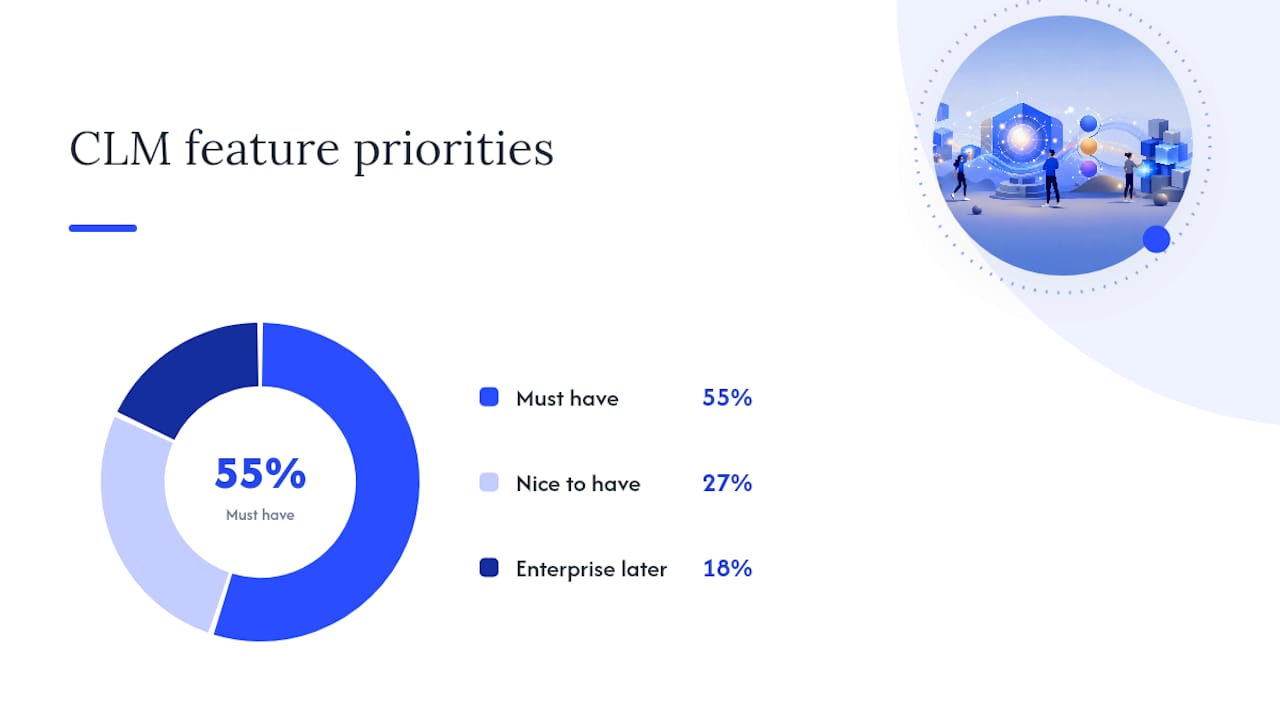
Not every CLM feature earns its cost at the seed or Series A stage. The table below maps core capabilities to priority level so you can decide what to configure on day one versus what to defer.
| Feature | Priority | Notes |
|---|---|---|
| Central contract repository | Must have | Replaces Drive folders; searchable by counterparty, type, status |
| Templates and clause library | Must have | Pre-approved language for NDAs, MSAs, SOWs, DPAs, LOIs |
| Intake and approval workflows | Must have | Routes contracts to the right approver without manual follow-up |
| Collaborative redlining | Must have | Both parties edit and align on terms before signing |
| Built-in e-signatures | Must have | Eliminates third-party signing tools and broken handoffs |
| Renewal and expiry tracking | Must have | Alerts before auto-renewals and termination windows close |
| AI contract review | Nice to have | Flags risks and missing clauses; valuable once volume picks up |
| Playbooks and fallback clauses | Nice to have | Useful when legal is negotiating dozens of deals per month |
| Granular permissions | Nice to have | Matters more when headcount and deal sensitivity increase |
| SLA-level reporting | Enterprise later | Relevant for compliance-heavy industries or large contract volumes |
| Advanced entitlements | Enterprise later | Needed when multiple business units manage separate contract sets |
A complete CLM bundles template-driven drafting, e-signature collection, approval workflows, renewal alerts, and a searchable repository with an audit trail. That full stack is the target state. But you do not need all of it on day one.
Integrations that move the needle for startups:
- CRM sync (Salesforce, HubSpot): Pulls deal data into contracts automatically; eliminates copy-paste errors on order forms and SOWs.
- Google Drive / cloud storage: Lets teams work in familiar tools while the CLM maintains the authoritative signed copy.
- Slack notifications: Routes approval requests and signature reminders without requiring users to log into another platform.
- E-sign API: Critical if your product itself needs to collect signatures from customers; a CLM with a native API removes the need for a separate signing vendor.
Pro Tip: Pick three features to launch with: templates, intake workflow, and e-signatures. Those three cover a majority of the contract friction a startup faces in its initial deals.
How do you choose the right CLM for your startup?
The evaluation criteria that matter most at the startup stage are different from what an enterprise legal team would prioritize. Speed to value, transparent pricing, and a clear API story matter far more than advanced reporting or multi-entity support.
Evaluation criteria, in priority order:
- Best for stage: Does the vendor have a plan designed for seed or Series A teams, not just an enterprise product with a startup discount?
- Pricing and cost to start: Is pricing per seat, per document, or usage-based? Can you start free or on a low monthly commitment?
- Time to set up: Can you reach a working state (repository, one template, e-sign enabled) within a week without an implementation consultant?
- Core feature coverage: Does it include redlining, e-signing, templates, and renewal tracking in the base plan, not as paid add-ons?
- Ease of use and onboarding: Will your AEs and ops team actually use it without training sessions?
- Integrations: Does it connect to your CRM, Google Drive, and Slack out of the box?
- Scalability: Is there a clear path to higher volume, more users, and API access as you grow?
- Security and compliance posture: SOC 2 Type II certification and encryption at rest and in transit are the baseline for any vendor handling signed agreements.
Red flags to watch for during vendor evaluation:
- Opaque pricing that requires a sales call to get a number
- Mandatory annual contracts with no monthly option for early-stage teams
- No data export or migration support (your contracts are your data; you need to own them)
- E-signing or redlining locked behind a higher tier
- No API or developer documentation
- Onboarding that requires a dedicated implementation project lasting weeks
Questions to ask during a demo:
- What is the realistic time from signup to first signed contract through the platform?
- How do we export all contracts and templates if we migrate later?
- Who owns the contract data, and where is it stored?
- What are the API rate limits, and how is API usage priced?
- Is pricing per seat or per document, and what happens when we exceed limits?
Run a one-week pilot before committing. Send one real NDA through the full workflow: create from template, send for redlining, collect e-signature, store in repository. If that loop takes more than two hours to configure, the tool is too heavy for your current stage.
How Formable maps to startup contract needs
Formable covers the full priority feature list from the section above without requiring enterprise-level commitment or a dedicated implementation team.
Feature alignment:
- AI contract review: Upload a contract at intake, load a playbook, and Formable flags risks and missing clauses automatically. Useful from the first vendor agreement.
- Collaborative redlining: Both parties edit terms in real time before reaching the signature stage. The redlining and negotiation API also lets developer teams embed this workflow directly into their own product.
- Built-in e-signing: Formable is a standalone e-signing provider with a native e-sign API, so you are not stitching together a separate DocuSign account.
- Contract creator: Templates combined with generative AI let you produce an NDA, MSA, SOW, DPA, or LOI in minutes rather than starting from a blank document.
- Audit trails: Every contract event is timestamped and immutable, which matters during fundraising diligence or a regulatory inquiry.
- Template storage and team dashboard: Centralized, searchable, and accessible to every team member with the right permissions.
Setup timeline:
- Day 1: Create your account, upload two to three existing contracts to seed the repository, and configure your first template (NDA is the fastest starting point).
- Days 2–3: Build one intake and approval workflow. Route new vendor contracts to legal review before they go out.
- Days 4–5: Enable e-signing on your NDA template and send a test agreement through the full cycle.
- Week 2: Add renewal alerts for active vendor contracts. Configure your MSA and SOW templates.
- Week 3–4: Connect your CRM or Google Drive integration. Begin using AI review on inbound contracts.
Sample startup workflows:
- Sales NDA to signed order form: AE triggers an NDA from a template, counterparty redlines two clauses, both parties align in Formable, NDA is signed. The same workflow carries through to the MSA and order form, all stored in one deal record.
- Vendor onboarding with approvals: Ops team submits a new vendor DPA through the intake form. Legal reviews and approves. Vendor receives the agreement for signature. Renewal alert is set automatically for the contract anniversary.
For teams building products that need embedded contract workflows, Formable's APIs for redlining and e-signing remove the need to build those capabilities from scratch.
What does CLM actually cost for a startup, and how fast can you set it up?
Pricing in the CLM market follows a few distinct shapes, and the right model depends on your deal volume and team size.
Cost structures to expect:
- Free or freemium tier: Suitable for solo founders or developers testing the workflow. Formable offers a free tier for individuals and developers. Open-source options like OpenCLM eliminate licensing fees entirely but shift the cost to engineering time and hosting.
- Team subscription: Monthly or annual per-seat pricing for small legal and ops teams. This is the most common model for seed to Series A startups.
- Usage-based pricing: Charged per e-sign event or API call. Relevant when your product collects signatures from customers at scale.
Time-to-value benchmarks:
- Day 1: Working repository and first template live
- Week 1: Full NDA-to-signature workflow running
- Week 2–3: Renewal alerts active, MSA and SOW templates configured
- Month 2: CRM integration connected, AI review in use on inbound contracts
What to watch in vendor contracts:
- Auto-renewal clauses in the CLM vendor's own agreement (ironic, but common)
- Per-seat pricing that jumps sharply when you add sales headcount
- Integration fees charged separately from the base subscription
- Data export limitations that create switching costs later
When negotiating with vendors, ask for a monthly pilot at a reduced rate before committing to an annual contract. Most vendors will accommodate this for early-stage teams, and it gives you real usage data to justify the spend internally.
When should you move from a lightweight CLM to an enterprise platform?
Most startups can run a lightweight CLM through Series B without hitting meaningful limitations. The triggers that justify an enterprise migration are specific and behavioral, not just about company size.
Move when you see these signals:
- Contract volume exceeds 200–300 active agreements and search and reporting become bottlenecks
- Multiple business units need separate approval chains, permissions, and reporting
- Regulatory requirements (HIPAA, SOC 2 audit support, GDPR data residency) demand features your current tool does not provide
- International contracts require multi-language clause libraries or jurisdiction-specific workflows
- API usage is sustained and high-volume enough to justify dedicated infrastructure
Migration checklist when you do move:
- Export all signed contracts in PDF and original format
- Export your template library and clause variants
- Preserve the full audit trail for every executed agreement
- Document your approval workflow logic before rebuilding it in the new system
- Confirm data residency and encryption standards in the new vendor's agreement
Signs you can wait:
- Your team is under 50 people and contract volume is manageable in a single dashboard
- You have not yet hit the limits of your current tool's reporting or permissions model
- Engineering bandwidth for a migration would be better spent on product
The cost of migrating too early is real: you pay implementation fees, lose team familiarity, and spend weeks rebuilding workflows. Wait for a concrete trigger, not a vague sense that you have "outgrown" the current tool.
How CLM reduces legal risk and compliance exposure for startups
Contract management is one of the most direct levers a startup has for controlling legal risk, and the impact shows up in three specific areas.
Clause consistency and liability control. When every NDA and MSA goes out from a pre-approved template, the liability language, limitation of liability caps, and indemnification terms are consistent across every deal. Without a CLM, individual contributors draft their own versions, and clause drift accumulates into real exposure. A single non-standard indemnification clause in a customer MSA can create outsized liability that a standard template would have prevented.

Audit readiness. Investors, acquirers, and regulators all ask for contract records. A CLM with immutable audit trails and a searchable repository means you can produce a complete contract register in hours, not weeks. The alternative, reconstructing executed agreements from email threads and Drive folders, is one of the most common causes of diligence delay in early-stage M&A.
Renewal and obligation tracking. Missed termination windows and unnoticed auto-renewals are a direct financial risk. Renewal alerts and obligation tracking in a CLM surface these dates before they pass. This applies to both vendor contracts (where missing a termination window locks you into another year) and customer agreements (where missed renewal outreach costs revenue).
Compliance obligations tied to data processing, such as DPA requirements under applicable privacy frameworks, also benefit from centralized contract management. When your DPA template is standardized and stored in a searchable repository, demonstrating compliance to a customer's security team or a regulator is a matter of retrieval, not reconstruction.
The case for adopting CLM before you think you need it
Most founders wait until a diligence scramble or a missed renewal forces the issue. That is the wrong trigger.
The argument for early adoption is not about sophistication. It is about compounding. Every contract you execute through a structured system builds a clean, searchable record. Every template you standardize removes a future negotiation variable. Every renewal alert you configure prevents a future surprise. The operational debt of unmanaged contracts grows faster than most founders expect, and it surfaces at the worst possible moments: fundraising, customer audits, and disputes.
The counterargument, that early-stage teams are too small to need a system, misses the point. A two-person legal team managing 40 active contracts across a CRM, Drive, and email is already overwhelmed. A CLM does not add process for its own sake. It removes the manual coordination that consumes legal and ops time that should go toward closing deals.
One candid lesson: the teams that struggle most with CLM adoption are not the ones who chose the wrong tool. They are the ones who configured too much too fast, built complex approval chains before the basics were working, and burned out their ops team on setup. Start with three features. Get them working. Add complexity only when the absence of a feature creates a real bottleneck.
Formable gives startups a complete contract workflow from day one
Startups that have been managing contracts across Drive folders and email threads can move to a structured workflow faster than most expect. Formable covers the full cycle: create agreements from templates using AI-assisted drafting, send for collaborative redlining, collect signatures through built-in e-signing, and store every executed contract with a complete audit trail.

For developers building products that need embedded contract workflows, Formable's developer APIs let you integrate e-signing and redlining directly into your platform without requiring a separate vendor relationship. The free tier lets individual founders and developers start immediately, with team and usage-based plans available as volume grows.
If you are evaluating CLM options for your startup, reach out and the Formable team will walk through your specific use case, whether that is a sales NDA workflow, a vendor onboarding process, or an embedded signing integration. Start with a free account at Formabledocs or explore the contract review engine to see how AI-assisted risk checks work on your existing agreements.
Sources
The links below cover the authoritative definitions, best practice frameworks, and Formable product pages referenced throughout this guide.
- Best practices for Contract Lifecycle Management (CLM) - Agiloft
FAQ
What is CLM software used for?
CLM software manages contracts from creation through execution and renewal, tracking obligations, storing executed agreements, and automating renewal alerts. For startups, the primary use cases are NDAs, MSAs, SOWs, DPAs, and LOIs across sales and vendor workflows.
How much does CLM software cost for a startup?
Pricing ranges from free (individual or developer tiers) to monthly team subscriptions, with usage-based pricing for e-sign API volume. The total cost depends on seat count, template volume, and API usage; many startup-focused platforms offer monthly plans with no long-term commitment required.
What is the difference between CLM and ERP?
CLM manages the full lifecycle of contracts, including drafting, negotiation, signing, and renewal tracking. An ERP manages broader business operations such as finance, HR, and supply chain. The two systems are complementary; CLM handles the contract record while ERP handles the downstream financial and operational execution.
What are the best practices for CLM at a startup?
The highest-leverage practices are a centralized repository with consistent naming, standardized templates for recurring contract types, automated renewal alerts, and an intake workflow that routes contracts to the right approver. Industry guidance consistently identifies these as the core pillars before adding automation or AI features.
How quickly can a startup set up a CLM?
A working repository, first template, and e-signing workflow can be live within one week using a platform like Formable. Full configuration, including CRM integration, renewal alerts, and AI review on inbound contracts, typically takes two to four weeks depending on existing contract volume and team bandwidth.