
An e-signature integration lets your Java service own the full signing loop instead of sending people out to another product. That keeps the workflow inside the app your users already know, and it removes the extra tabs and handoffs that usually slow the document signing process down.
In this blog post, we'll show you how to easily add e-signing into your own application using Formable. Formable offers a robust Java SDK and detailed documentation to make the integration process as easy as possible.
What you'll need:
- Java 17 or newer
- A Formable account (paid or free sandbox)
- An API key from Formable account settings
Why an e-signature API from Java?
Say you write Java for an HRIS. Each hire still needs an offer letter signed by the candidate and the hiring manager. When that lives in email attachments and a shared drive, the latest file goes missing, nobody can tell who has signed, and the start date slips. By integrating with Formable, all those manual signing processes can be automated within the HRIS.
Step 1: installing the Formable Java SDK
Maven:
<dependency>
  <groupId>com.formabledocs</groupId>
  <artifactId>formable-sdk</artifactId>
  <version>0.1.0</version>
</dependency>
Gradle:
implementation("com.formabledocs:formable-sdk:0.1.0")
Note:
For more details and advanced usage, you can also reference the Official Formable Java SDK Documentation.
Step 2: creating the client
Create one client and register it as a Spring bean. The SDK uses the JDK HttpClient, so there is no extra HTTP stack to wire.
import com.formabledocs.Formable;
import org.springframework.context.annotation.Bean;
import org.springframework.context.annotation.Configuration;

@Configuration
public class FormableConfig {

  @Bean
  public Formable formable() {
    return new Formable(System.getenv("FORMABLE_API_KEY"));
  }
}
Step 3: create a template from your document
A template is the re-usable document where you or your users place the fields for the signers to fill in.
Signer roles are optional for single signers. If you need to support multi-party signing, they are required as you need to specify which role needs to fill out which field.
var created = formable.templates.create(
    Path.of("offer-letter.pdf"),
    List.of(
        new TemplateSignerRole("Candidate", 0),
        new TemplateSignerRole("HiringManager", 1)
    )
);

String templateId = created.templateId();
System.out.println(created.editTemplateAccess().editUrl());
Open the edit URL, place at least one required signature field, assign it Candidate. The URL expires after a day:
var edit = formable.templates.createEditUrl(templateId);
System.out.println(edit.editUrl());
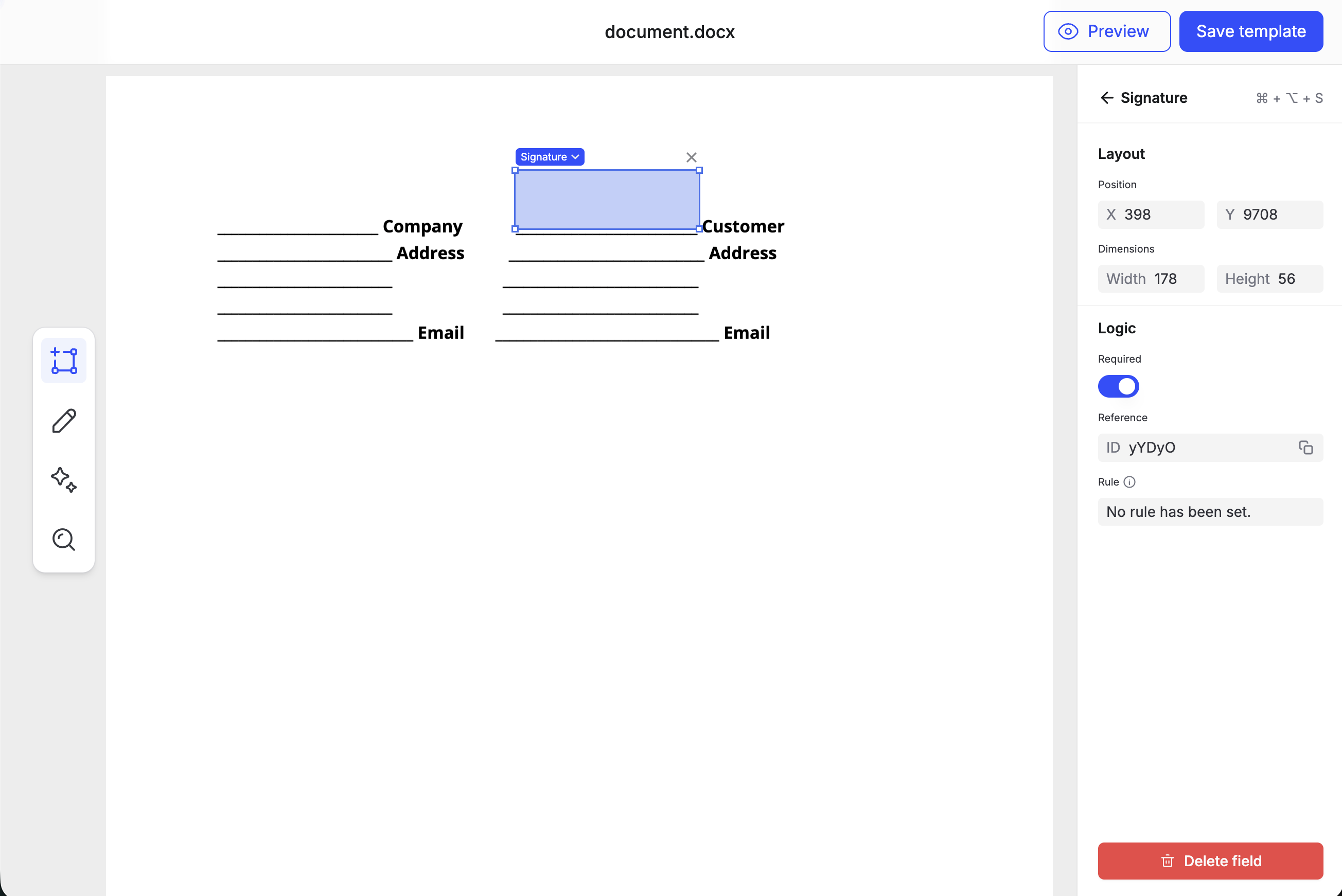
Save templateId and reuse it for later signature requests.
Step 4: choose a signing flow
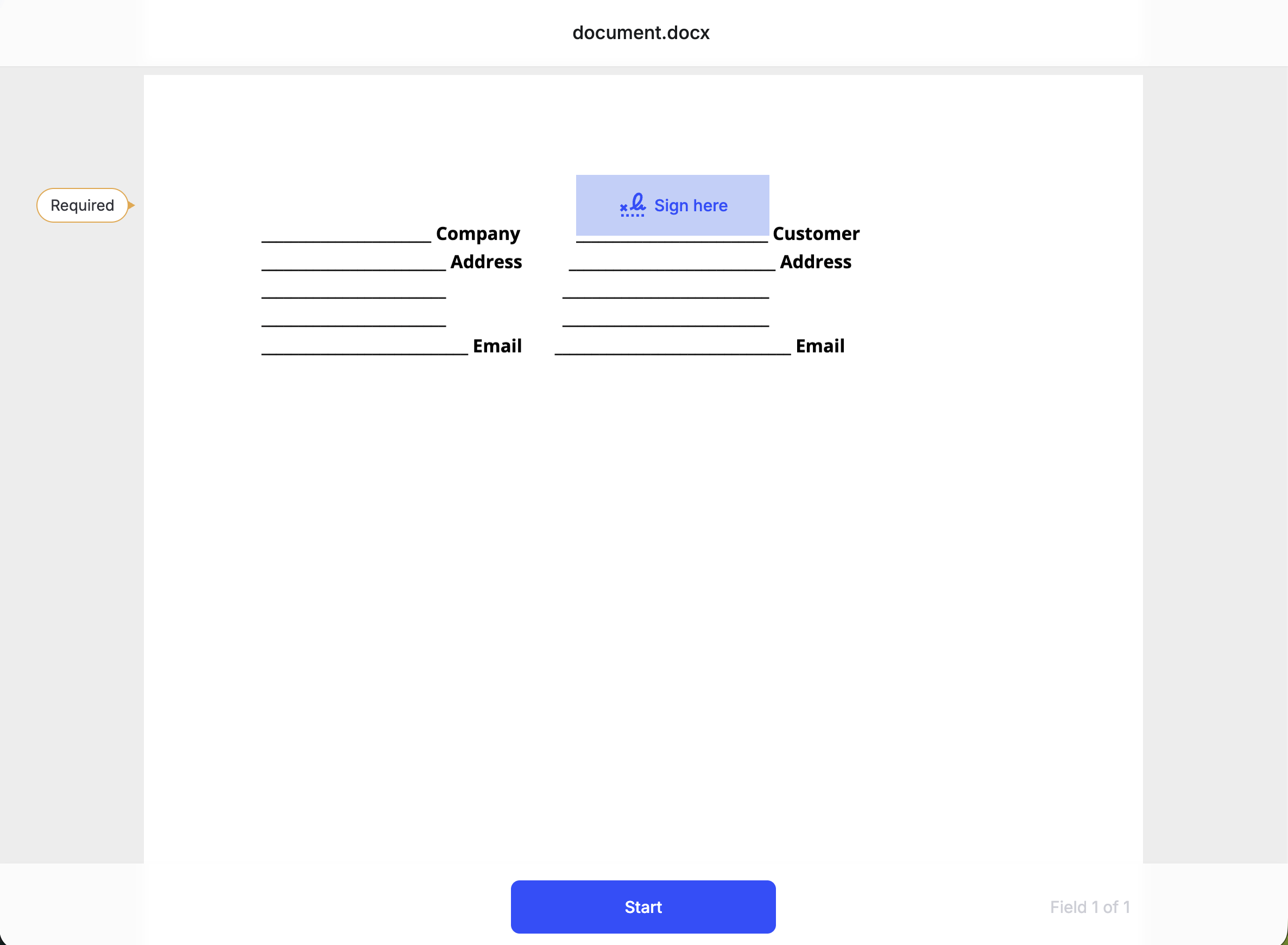
You can choose to send a signing link via email to your user, or have your user sign within your own application within an iFrame.
If choosing email delivery, implement using the following code snippet.
var request = formable.signatureRequests.create(
    CreateSignatureRequest.builder()
        .templateId(templateId)
        .addSigner(new Signer("jane@example.com", "Jane Doe", "Candidate"))
        .addSigner(new Signer("mgr@yourco.com", "Alex Chen", "HiringManager"))
        .testMode(true)
        .build()
);

System.out.println(request.signatureRequestId()); // save this
If you want your users to sign inside your application, the next section will show you how to implement the iframe path.
Step 5: embed signing in a Spring Boot app
Embedded signing requires two server calls.
First: Create the signature request.
Second: Mint a short-lived signing URL using the id from the signature request.
@RestController
public class SignatureController {

  private final Formable formable;

  public SignatureController(Formable formable) {
    this.formable = formable;
  }

  @PostMapping("/api/signature-requests")
  public Map<String, String> create(@RequestBody Map<String, Object> body) {
    @SuppressWarnings("unchecked")
    Map<String, String> signer = (Map<String, String>) body.get("signer");

    var request = formable.signatureRequests.createEmbedded(
        CreateSignatureRequest.builder()
            .templateId((String) body.get("templateId"))
            .addSigner(new Signer(signer.get("email"), signer.get("name"), "Candidate"))
            .testMode(true)
            .build()
    );

    return Map.of(
        "signatureRequestId", request.signatureRequestId(),
        "recipientSignatureId", request.signers().get(0).recipientSignatureId()
    );
  }

  @GetMapping("/api/signing-url")
  public Map<String, String> signingUrl(@RequestParam String recipientSignatureId) {
    var signing = formable.signatureRequests.createSigningUrl(recipientSignatureId);
    return Map.of(
        "signingUrl", signing.signingUrl(),
        "expiresAt", signing.expiresAt()
    );
  }
}
On the client, fetch the URL from your Java service and load it in an iframe. Formable posts onSigningComplete to the parent window:
const { signingUrl } = await fetch(
  `/api/signing-url?recipientSignatureId=${recipientSignatureId}`
).then((res) => res.json());

document.getElementById("signing-frame").src = signingUrl;

window.addEventListener("message", (event) => {
  if (event.origin !== "https://app.formabledocs.com") return;
  if (event.data?.type === "onSigningComplete") {
    // close the iframe or show a success state
  }
});
<iframe
  id="signing-frame"
  width="100%"
  height="800"
  allow="fullscreen"
  style="border: none;"
></iframe>
Step 6: handle webhooks
Register the path in Settings and keep the secret. Do not put @RequestBody on this mapping. Spring will parse the JSON for you, which breaks HMAC. Read the servlet stream first.
@RestController
public class FormableWebhookController {

  private final Formable formable;
  private final ObjectMapper mapper = new ObjectMapper();

  public FormableWebhookController(Formable formable) {
    this.formable = formable;
  }

  @PostMapping("/webhooks/formable")
  public ResponseEntity<Void> handle(HttpServletRequest request) throws Exception {
    byte[] rawBody = request.getInputStream().readAllBytes();
    String received = request.getHeader("Content-Sha256");
    byte[] secret = Base64.getDecoder().decode(System.getenv("FORMABLE_WEBHOOK_SECRET"));
    Mac mac = Mac.getInstance("HmacSHA256");
    mac.init(new SecretKeySpec(secret, "HmacSHA256"));
    String expected = Base64.getEncoder().encodeToString(mac.doFinal(rawBody));

    if (received == null || !MessageDigest.isEqual(
        expected.getBytes(StandardCharsets.UTF_8),
        received.getBytes(StandardCharsets.UTF_8))) {
      return ResponseEntity.status(401).build();
    }

    JsonNode payload = mapper.readTree(rawBody);
    if ("document_completed".equals(payload.path("event").path("event_type").asText())) {
      var envelope = formable.signatureRequests.getSignedEnvelope(
          payload.path("signing").path("signature_request_id").asText()
      );
      // download envelope.signedEnvelopePresignedUrl(), store the PDF
    }

    return ResponseEntity.ok().build();
  }
}
document_completed is the terminal event. Once you receive this event, this means all parties have signed the document, and you may now fetch the signed document.
Alternatively, if you don't want to expose a webhook endpoint, you can poll for signature request status updates.
var current = formable.signatureRequests.get(signatureRequestId);
if (current.status() == SignatureRequestStatus.COMPLETED) {
  // safe to download
}

var recent = formable.signatureRequests.list(Instant.now().minus(Duration.ofDays(1)));
Step 7: download the signed PDF
The signed envelope URL is a short-lived presigned link.
var envelope = formable.signatureRequests.getSignedEnvelope(signatureRequestId);
byte[] pdf = HttpClient.newHttpClient().send(
    HttpRequest.newBuilder(URI.create(envelope.signedEnvelopePresignedUrl())).GET().build(),
    HttpResponse.BodyHandlers.ofByteArray()
).body();
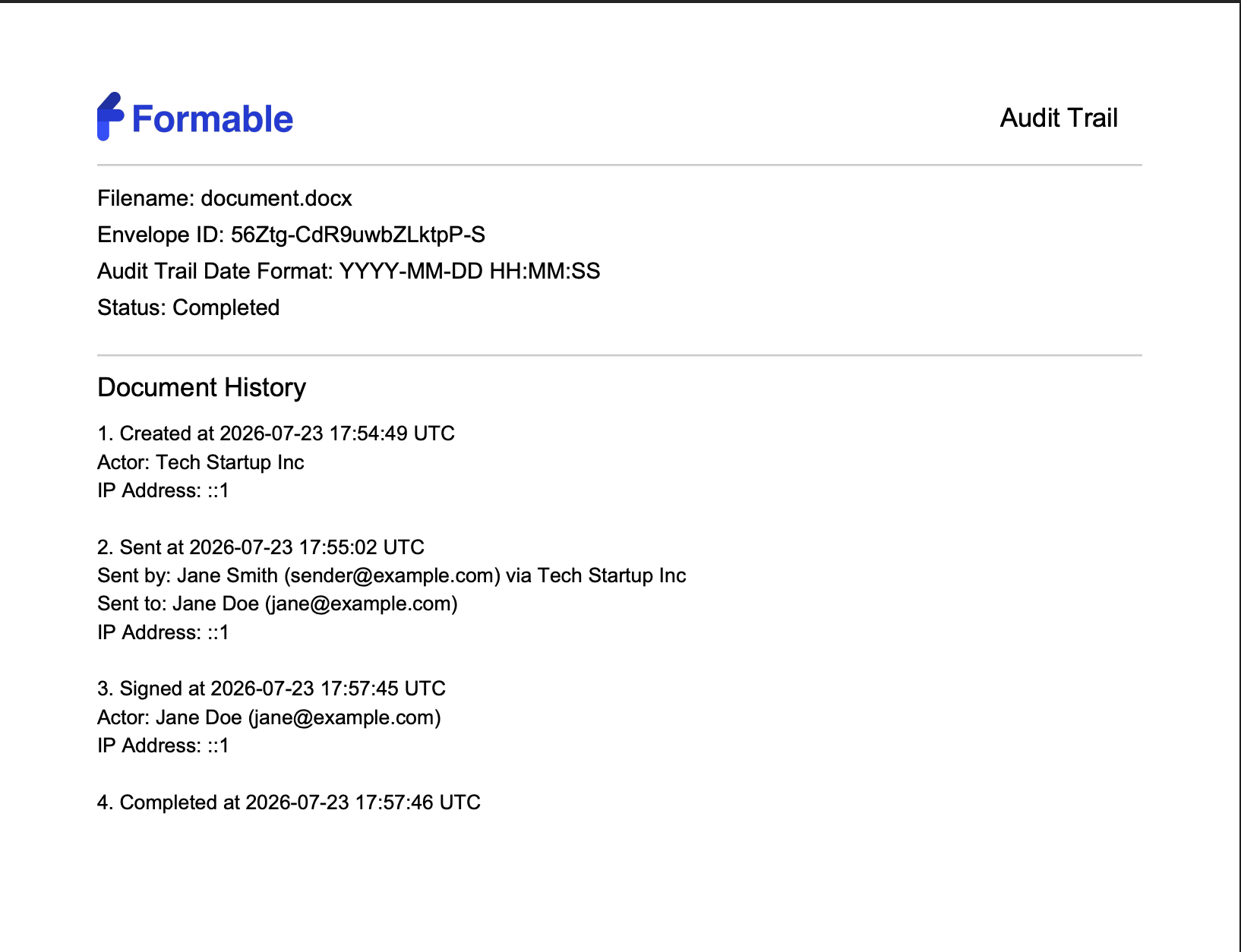
The signed envelope includes the Formable audit trail of all relevant events.
Error handling and test mode
Non-2xx responses throw a FormableException. A 409 from getSignedEnvelope means the document is not finished:
try {
  formable.signatureRequests.getSignedEnvelope(signatureRequestId);
} catch (FormableException error) {
  if (error.status() == 409) {
    // wait for document_completed
    return;
  }
  throw error;
}
400 is usually a fieldId that is not on the template. 401 is the API key. 404 is an unknown id.
Set .testMode(true) while you integrate. Test documents are watermarked, not legally binding, and do not count toward billing. Clear the flag for production.
Conclusion
Your Java service now owns signing end to end: a reusable template, email or embedded signing, a verified webhook, and a signed PDF with an audit trail stored on your side. The same handlers work whether the document is finance, HR, real estate, or anything else your app already creates.
To learn more about the Formable API, take a look at our API documentation. We support SDKs for a wide variety of languages, and are always looking to support more in the near future.
If you have questions, email matt@formabledocs.com. We are always happy to assist you!
FAQs
How do I add e-signatures to a Java application?
Add com.formabledocs:formable-sdk, create a template from your PDF or DOCX, then create a signature request. Formable can email signers, or you can generate a signing URL and embed it in an iframe. A webhook tells you when to download the signed PDF.
Does the SDK depend on a web framework?
No. It uses the JDK HttpClient. The examples use Spring Boot. Register Formable as a bean and inject it into controllers. Read HttpServletRequest.getInputStream() on the webhook route before Jackson touches the body.
How do I know when a document has been signed?
Handle document_completed on your webhook, or poll get until status is COMPLETED.
Can I test without sending legally binding documents?
Yes. Set .testMode(true) on signature requests. Test documents are watermarked, not legally binding, and do not count toward billing.
Does the signed PDF include an audit trail?
Yes. Every signed document includes an appended audit trail with created, sent, signed, and completed events, including timestamps, actors, and IP addresses, which supports enforceability under ESIGN and UETA.