
An e signature API is a set of endpoints that let your application create documents, route them to signers, and capture legally binding signatures without redirecting users to a third-party site. It's the right integration whenever your product needs signing built into an existing workflow rather than bolted on as a separate step.
Three cases come up constantly:
- Embedded signing inside your own app's UI, so a customer never leaves your product to sign a lease, order form, or waiver.
- Automated contract workflows, where a CRM or billing event triggers document creation and routing without a human touching it.
- Backend batch signing, useful for onboarding hundreds of contractors or vendors on a schedule.
If any of that sounds like your roadmap, Formable's embedded signing API is built specifically for developers who need this now, not after months of vendor evaluation.
Key Takeaways
Embedded signing through a well-documented e-signature API reduces integration risk more than any single pricing or vendor decision.
| Point | Details |
|---|---|
| Match signature type to requirement | Use certificate-backed digital signatures only when regulation or counterparty risk demands cryptographic proof. |
| Build idempotent webhook handlers | Design for duplicate delivery and retries before launch, since providers commonly resend failed webhook events. |
| Verify the full checklist early | Confirm templates, audit trails, signer authentication, and PDF retrieval work in sandbox before production. |
| Choose custody model deliberately | Decide between signing a hash or a full document based on who needs to hold the canonical file. |
| Start with Formable's sandbox | Formable's SignatureRequestUrl embedded flow and developer docs offer a direct starting point for prototyping. |
What is an e signature API and how does it differ from digital signature?
The terms get used interchangeably, and that's where a lot of integration mistakes start. An electronic signature is any electronic mark that shows intent to agree, a typed name, a drawn signature, or a checkbox click tied to an audit record. A digital signature is narrower and stronger: it uses a cryptographic certificate to bind a specific signer's identity to the exact document bytes, and it's what regulations like eIDAS and PSD2 require for many high-value or regulated transactions.
Most e-signature APIs give you a common toolkit regardless of which type you need:
- Envelopes that bundle a document with its recipients and fields.
- Templates for repeatable agreement types (NDAs, order forms, SOWs).
- Signer routing to control who signs in what order.
- Audit trails logging every view, field entry, and signature event.
Require certificate-backed digital signatures when your industry mandates non-repudiation, think finance, healthcare, or government procurement. For everything else, a standard e-signature API covers the legal bar most contracts need.
What features should you verify before choosing an eSignature API?
Not all providers expose the same depth of control, and the gaps usually surface mid-integration, right when you can least afford them. Run through this before committing to an SDK:
- Embedded signing options: does the API return a hosted URL you can iframe, or does it force a redirect away from your domain? Check whether the embedded UI supports your brand's colors and logo.
- Templates and merge fields: can you programmatically inject variables (names, dates, dollar amounts) into a template, and does the provider generate the final PDF server-side?
- Webhooks and status events: you need real-time notifications for
sent,viewed,signed, anddeclined, not just polling. - Audit trails: verify the log captures IP address, timestamp, and authentication method per signer, not just a generic "completed" flag.
- Signer authentication: options should range from email verification up to SMS codes or ID verification for higher-risk documents.
- Document retrieval: confirm you can pull the final signed PDF and its certificate of completion via API, not just through a dashboard.
Treat this as a checklist during your proof of concept, not something you discover in production.
How do you integrate e-signing into your application?
The pattern is consistent across most providers, which makes it easy to plan a sprint around it.
- Create the document. Generate a PDF server-side (or upload a static one) and define signer fields: name, date, initials, signature block.
- Create a signing session. Call the API to generate a signing request tied to that document and a specific signer.
- Show the embedded UI. Load the returned session URL in an iframe inside your app, or redirect the signer to a hosted page if you don't need embedding.
- Handle completion and webhooks. Listen for the
signedevent, then fetch the completed document and its audit certificate. - Archive and notify. Store the signed PDF in your document system and trigger any downstream workflow, provisioning access, kicking off billing, updating a CRM record.
Embedding an iframe session keeps the signer inside your product's look and feel and generally improves completion rates, but it demands more engineering care around CORS policies, responsive sizing, and field mapping than a simple redirect does, per Formable's own implementation guide. A hosted redirect is faster to ship if you're validating demand before investing in a polished in-app flow.
On the server side, you own PDF generation, field coordinate mapping, and validating signer input before it ever reaches the signing session. One decision worth flagging early: some providers let you sign a cryptographic hash of the document instead of the full file. That approach keeps the canonical document bytes on your infrastructure, which matters if your compliance team wants custody of the original file rather than trusting a third party's copy.
Pro Tip: Build your webhook handler and your polling fallback at the same time. Webhooks fail silently more often than teams expect, and a nightly reconciliation job that checks signature status via API saves you from missed completions.
How should you handle authentication and webhook reliability?
Treat signing infrastructure like any other production dependency, because a missed webhook means a contract nobody knows got signed.
- Use API keys for server-to-server calls where your backend owns the entire flow, and rotate them on a schedule rather than leaving one key live for years.
- Use OAuth when a user needs to grant your app delegated access to their own signing account, common in CRM or document-management integrations.
- Apply least privilege: a key scoped to "create envelope" shouldn't also be able to delete audit records.
- Design webhook handlers to be idempotent. Providers retry delivery on failure, and your endpoint needs to safely process the same event twice without double-firing downstream actions, a pattern Formable's webhook documentation covers directly.
Pro Tip: Log every signature event with its raw webhook payload before you process it. When a signer disputes a completion date months later, that log is the fastest way to answer support without re-opening the provider's dashboard.
Watch rate limits closely during batch operations. Bulk-sending 500 contractor agreements in one loop is the kind of thing that trips a limit you didn't know existed until it's blocking production traffic.
When do you actually need certificate-based digital signatures?
Plain e-signatures satisfy the legal requirements for most commercial agreements: NDAs, order forms, service agreements. Certificate-backed digital signatures become necessary when a regulator, auditor, or counterparty demands cryptographic proof that the document hasn't been altered since signing, and that the signer's identity was verified beyond an email click.
Digital signatures bind a verified identity to a signing certificate and the exact bytes of a document, which is why frameworks like eIDAS and PSD2 require them for certain regulated and high-value transactions rather than accepting a simple electronic signature.
When you're auditing a provider's compliance claims, check three specific elements in the audit trail: a timestamp tied to a trusted time source, a certificate chain you can validate independently, and the signer identity method used, email link, SMS code, or a third-party identity verification (IDV) check. Formable documents its security posture around these exact elements, which is worth comparing against any vendor you're evaluating.
Custody is the other decision point. Signing a hash keeps the canonical file on your servers and gives you tighter control over evidence, useful in regulated environments where you can't hand your source document to a third party. Signing a full PDF through the provider is simpler to implement but means the provider's copy becomes the reference document of record.
What should you check on pricing, sandbox access, and docs?
Pricing models generally fall into three shapes: per-signature fees for occasional or low-volume use, flat subscriptions for predictable mid-volume teams, and usage-based tiers for high-volume platforms sending thousands of envelopes monthly. Match your expected monthly signature volume against each shape before committing, since per-signature pricing that looks cheap at ten contracts a month gets expensive fast at ten thousand.
Beyond price, confirm the provider gives you:
- A sandbox or test mode you can hit without burning production credits.
- SDKs in your primary language, plus an API explorer for quick manual testing.
- Sample apps or code snippets covering the full flow, not just isolated endpoint examples.
Providers offering multi-language code samples and a working quickstart consistently cut integration time compared to docs that only list endpoint schemas.
How does Formable's API fit these integration patterns?
Formable's e-signing API is built around the same embedded pattern engineers actually want: your app calls the API, gets back a SignatureRequestUrl, and loads it directly in your product rather than sending users elsewhere. That single design choice maps to nearly every checklist item above.
- Templates and AI-assisted contract generation, so you can programmatically create NDAs, MSAs, or order forms and route them straight into the signing flow.
- Audit trails and redlining integration, useful if your workflow needs negotiation before signature rather than a static document.
- Security and compliance references on Formable's security page, covering how audit data and legally binding signatures are handled.
Explore Formable's developer APIs for embedded e-signing, redlining, SDKs, and implementation examples.
Pro Tip: Start with the sandbox account and the embedded signing quickstart before you design your own UI wrapper. Most of the integration time teams lose comes from re-solving problems the sample app already handles.
Editorial take: build for the pattern, not the vendor
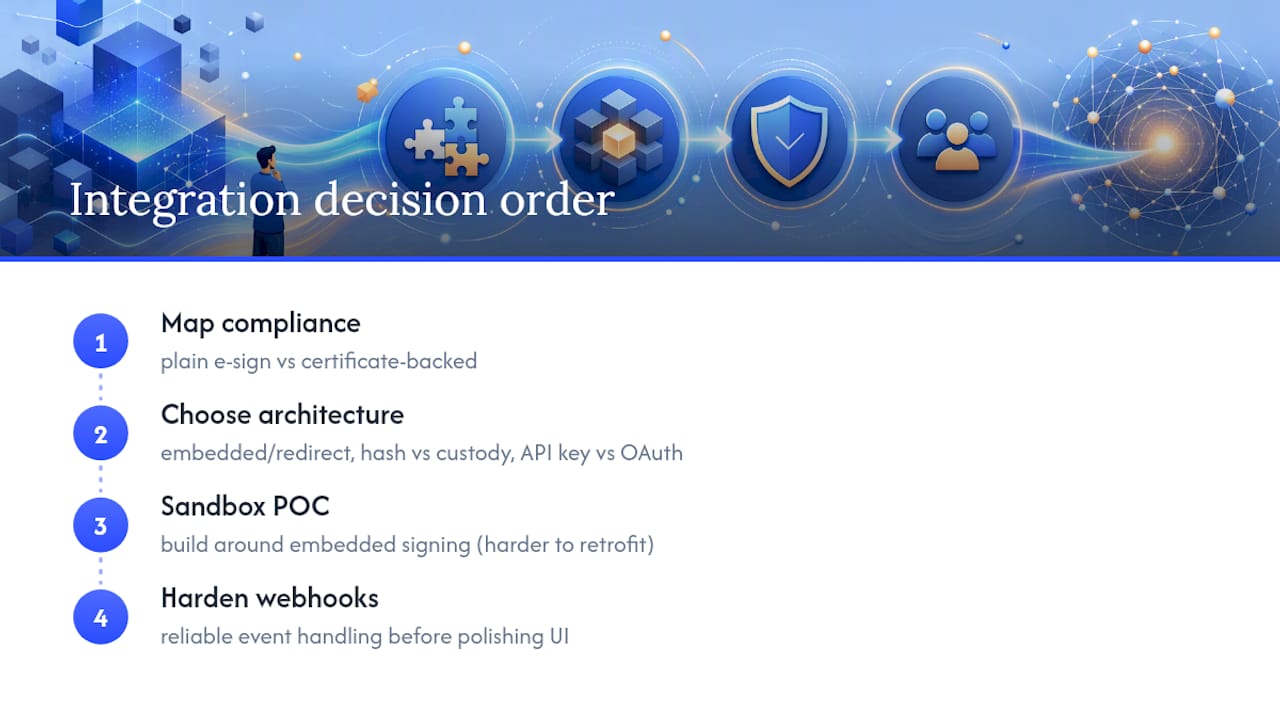
The conventional advice on e-signature APIs treats provider selection as the first decision. It shouldn't be. The first decision is architectural: embedded or redirect, hash-signing or full-document custody, API keys or OAuth. Get those wrong and swapping vendors later won't fix the underlying integration debt.
What's underrated is how much the webhook layer determines whether an integration feels solid or flaky in production. Teams spend weeks polishing the signing UI and then bolt on a webhook handler in an afternoon, which is backward. A signature event that silently fails to update your CRM is a worse experience than a slightly plain signing screen.
What the reader should prioritize first: map your compliance requirement (plain e-signature vs. certificate-backed) before writing a line of integration code, then build the sandbox proof of concept around embedded signing rather than a redirect, since that's the harder pattern to retrofit later. Everything else, pricing tier, SDK language, template design, is a second-order decision once those two are settled.
Get embedded signing running with Formable
Formable gives development teams an e-signing API built for the embedded pattern this article walks through: call the API, get a SignatureRequestUrl, and load signing directly inside your product instead of redirecting users away. It pairs with contract generation, redlining, and audit trails in one platform, so teams that need signing plus negotiation workflows aren't stitching together three separate tools.

If your app needs contractor agreements, order forms, or NDAs signed without leaving your UI, the embedded signing documentation has the quickstart and code samples to get a sandbox integration running this week. Teams building more complex agreement flows can also generate documents directly from contract templates and route them straight into the same signing API. Start with the sandbox, confirm the webhook flow works end to end, and go from prototype to production without switching providers.
Sources
- Digital Signature Service | Sign documents securely online - GlobalSign
FAQ
Is there an API available for digital signatures?
Yes. Most e-signature providers, including Formable, offer APIs for standard electronic signatures, and some support certificate-backed digital signatures for regulated use cases requiring cryptographic proof of signer identity.
Is there a free eSignature API available?
Many providers offer a free sandbox or limited free tier for testing integrations before moving to paid usage tiers, so confirm sandbox access before committing to a paid plan.
What is an eSignature API?
An eSignature API is a set of endpoints that let developers create documents, route them to signers, and capture legally binding signatures directly inside their own application rather than through a separate portal.
Is there an API for DocuSign?
DocuSign offers its own API, but developers evaluating options should compare embedded signing flows, pricing shapes, and documentation quality across providers like Formable rather than assuming one vendor fits every integration.
When should I require certificate-based signing instead of a standard e-signature?
Require certificate-based signing when your industry or counterparty demands cryptographic non-repudiation, common in finance and healthcare, since standards like eIDAS and PSD2 mandate it for specific regulated transactions.