
The recommended approach is to embed an integrated contract editor with redlining and e-signature via API, keeping the entire workflow inside your product. Formable supports exactly this: a single platform covering template population, collaborative negotiation, and legally admissible e-signing with developer APIs. Request sandbox API keys and run a 15-minute proof of concept to validate fit before committing engineering time.
- Security: Contracts stay in-app, reducing external downloads and data exposure while role-based access controls limit who can view or edit each document.
- Developer signals: SDKs, webhooks, and a sandbox environment let your team validate DOCX fidelity and signing flows before production.
- Outcome: Faster review-to-sign cycles on NDAs, MSAs, SOWs, DPAs, and order forms, with fewer support tickets from users lost in external tools.
Pro Tip: Start with template population and in-browser editing before adding redlining. Getting the edit experience right first cuts review cycles more than any other single change.
Key takeaways
An embedded contract editor with redlining, approval routing, and e-signing via API is the most direct way to reduce deal cycle time and keep sensitive contract data inside your product.
| Point | Details |
|---|---|
| Embed the full workflow | Keep editing, redlining, and signing in-app to reduce data exposure and user drop-off. |
| Validate DOCX fidelity early | Test with your real contract templates in a sandbox before committing to a vendor. |
| Build idempotent webhook handlers | Vendors retry with exponential backoff; your handler must deduplicate and enqueue work quickly. |
| Confirm hosting and data residency | Choose SaaS or on-prem based on your customers' compliance requirements before signing a vendor contract. |
| Formable as the recommended solution | Formable provides embedded editing, redlining, e-sign APIs, audit trails, and a free developer tier for PoC validation. |
Why keeping contracts in-app improves security and completion rates
Redirecting users to an external editor or signing portal breaks the workflow at the worst possible moment. Every handoff is a drop-off risk, a support ticket, and a potential data exposure point.
Embedding a contract editor and signing flow keeps contracts within your application, enabling role-based access and audit trails while reducing external downloads. Users never leave your product to open a desktop Office application, download a PDF, or create an account on a third-party signing service.
The practical benefits are concrete:
- Fewer abandoned contracts from users who get lost in external tools
- No Office plugin dependencies, since a good SDK handles DOCX editing in-browser
- PDF conversion for archival without leaving the app
- Shorter review cycles because comments and redlines happen in context
- Lower support volume from confused signers
The contract types that benefit most from this approach are NDAs, MSAs, SOWs, DPAs, pilot agreements, and order forms. These are the agreements your GTM team sends repeatedly, where a consistent in-app experience directly affects deal velocity.
Pro Tip: Prioritize in-browser editing and template population first. Teams that get these two right typically see the biggest reduction in review cycle time before they even add redlining.
What features does an embedded contract editor actually need?
From a developer's perspective, the minimum viable feature set covers the full contract lifecycle from draft to signed archive. Here is how each capability maps to integration complexity:
| Feature | Why it matters | Integration complexity |
|---|---|---|
| Live DOCX editing | Preserves formatting fidelity for legal contracts | Medium |
| Redlining / track changes | Enables negotiation without version confusion | Medium |
| Inline comments | Keeps context attached to specific clauses | Low |
| Template population | Populates fields from your data model | Low |
| PDF conversion | Archival-ready output without external tools | Low |
| E-signature | Legally admissible signing inside the app | Medium |
| Audit trail | Immutable timestamp log for every edit and signing event | Medium |
| Role-based access | Controls who can view, edit, comment, or sign | Medium |
| Webhooks / events | Drives application state from signing and approval events | High |
| Versioning | Tracks document history across negotiation rounds | Medium |
| Approval routing | Sequential or parallel sign-off before signing | High |
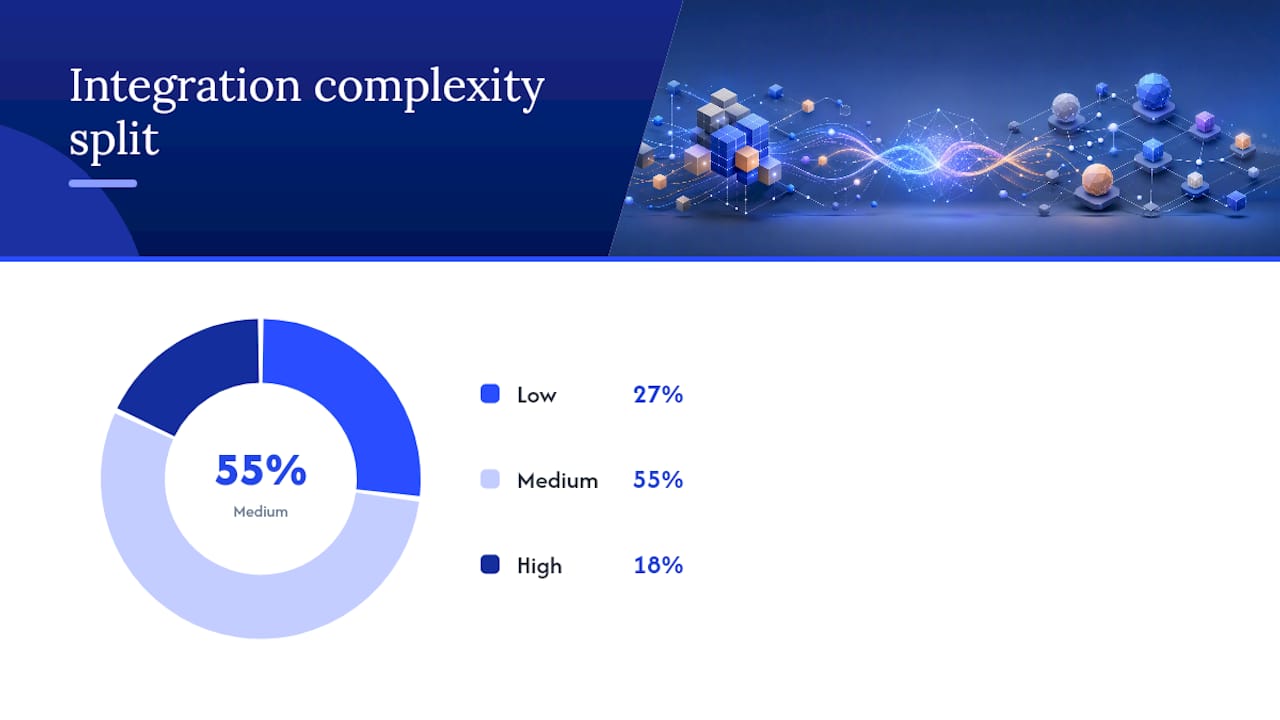
High-fidelity DOCX editing requires an editor engine built for Office formats; simple conversions via generic APIs can degrade layout and break contract integrity. Test this early in your PoC.
Must-have for any SaaS integration: live editing, e-signature, audit trail, webhooks, and role-based access. Should-have: redlining, template population, PDF conversion, versioning. Nice-to-have for early-stage: approval routing, advanced compliance (QES), multi-signer orchestration.
How to evaluate vendors: questions to ask and red flags to watch
The evaluation centers on four dimensions: SDK surface area, hosting options, data flow control, and webhook reliability.
Technical questions to ask every vendor:
- Does the editor mount via a React or Vue component, or does it rely on a global script or iframe injection?
- What is the DOCX fidelity guarantee, and can you test it with your own contract templates in a sandbox?
- Does the SDK expose clear REST or GraphQL endpoints for saving and retrieving document state?
- Is SSO (SAML/OAuth) supported for enterprise authentication flows?
- What are the Content Security Policy requirements for iframe embedding?
- What are the rate limits on signing API calls, and what is the retry behavior on webhooks?
- What SLA tiers are available, and what is the incident response commitment?
- Is pricing per-document, per-signature, per-seat, or a combination?
Good embeddable SDKs support mounting via framework components, avoid fragile iframe hacks, and expose clear APIs for saving and retrieving content. SSO support is a hard requirement for enterprise customers.
Red flags that indicate a high-risk integration:
- No sandbox or API key available before a sales call
- Forced vendor branding on the signing experience with no white-label option
- Opaque pricing that requires a quote for basic usage tiers
- No role-based access controls at the document level
- Weak webhook guarantees with no signature verification or retry documentation
A minimal signing integration uses one POST request to send a document and webhooks to update application state. If a vendor cannot show you that flow in their docs within five minutes, treat it as a red flag.
Step-by-step implementation roadmap for embedding editing and signing
A production-ready integration follows five ordered phases. Run phases 1 and 2 as your PoC; phases 3 through 5 are production scope.
- Template and data model: Define your contract templates (DOCX), map your data model fields to template variables, and validate population logic.
- Editor embed and UI: Mount the editor component in your app, configure role-based access, and confirm DOCX fidelity with real contract files.
- Collaboration and redlines: Enable track changes and inline comments; test concurrent editing behavior under realistic user load.
- Approval routing and signing orchestration: Configure sequential or parallel signing order, trigger signing ceremonies from your backend, and wire webhook handlers.
- Archival and retention: Store signed PDFs with immutable audit logs, configure retention policies, and validate e-discovery access patterns.
Architecture notes:
- Client-side: editor component mounted in your frontend framework
- Server-side: document conversion, signing orchestration, and webhook processing
- Webhook processor: idempotent handlers that enqueue work for background jobs
- Storage: encrypted at rest, with access scoped by tenant
Webhook handlers must be idempotent and enqueue work quickly; vendors commonly retry with exponential backoff, so your endpoint must validate the webhook signature and return a 200 before doing any heavy processing.
QA checklist before production:
- Signing link expiry handling (what happens when a link expires mid-ceremony?)
- Concurrent editing behavior under load
- Webhook deduplication for retry scenarios
- Mobile responsiveness of the signing experience
Pro Tip: Lock the signing ceremony design before you build approval routing. Changes to signer order or field placement after routing logic is wired cause disproportionate rework.
Security, hosting, and compliance for U.S. contract workflows
Cryptographic audit trails, access controls, and hosting choices must align with your data sensitivity and your customers' expectations before you go to production.
Technical controls to verify:
- TLS 1.2 or higher for all data in transit
- AES-256 encryption at rest with customer-controlled key management options
- Tenant isolation at the data layer, not just the application layer
- Role-based access controls scoped to document, team, and organization levels
- Webhook signature verification to prevent spoofed event injection
Compliance considerations for U.S. teams:
The ESIGN Act establishes that electronic signatures are legally admissible in the U.S. for most commercial agreements. Your audit log must capture the signer's identity, intent, and timestamp for each signing event to meet this standard. Immutable audit trails also support e-discovery and regulatory inquiries.
Vendor deployment options, whether hosted SaaS or on-prem/private cloud, directly affect compliance and data residency. Some vendors offer migration paths from hosted to self-hosted with minimal integration changes, which matters if your customers are in regulated industries.
Vendor security checklist:
- SOC 2 Type II certification
- Data residency options (U.S.-only hosting available)
- On-prem or private cloud deployment path
- Webhook signature verification documented in the API reference
- Incident response SLA with defined notification windows
What good developer experience looks like, and how Formable delivers it
Good DX means clear REST endpoints, client SDKs for your frontend framework, a sandbox with real API keys, runnable sample apps, and a webhook-first event model. If you cannot get from API key to a working signing flow in under an hour, the integration cost will be higher than the vendor's sales deck suggests.
A single client-side toolkit can keep contracts in-app, support DOCX editing and track changes, and enable in-browser signing without stitching multiple third-party services. That consolidation reduces attack surface and eliminates the friction of coordinating separate authoring, conversion, and signing vendors.
What to look for in an SDK:
- React and Vue component mounting (no global script injection)
- Direct REST or GraphQL endpoints for document state
- SAML/OAuth support for enterprise SSO
- Sandbox environment with isolated API keys
- Sample app or runnable demo covering the full create-to-sign flow
Example API flow with Formable:
- Create a contract from a DOCX template using field population
- Open the embedded editor for collaborative review and redlining via Formable's negotiate flow
- Route for approval and trigger the signing ceremony via API
- Receive webhook events for each signing step and update your application state
- Archive the signed PDF with a complete audit trail
Pro Tip: Test DOCX fidelity in the sandbox with your actual contract templates, not the vendor's sample files. Layout-sensitive agreements like MSAs and DPAs expose rendering gaps that generic samples hide.
How vendors price embedded editors and what drives your costs up
Pricing for an embedded contract editor typically combines a base SDK or platform license with per-signature or per-document fees, plus storage and optional enterprise support tiers.
Primary cost drivers:
- API call volume for document creation and conversion
- Number of signed documents per month
- Multi-signer workflows (each additional signer often adds cost)
- Storage retention duration for signed archives
- Advanced compliance features such as qualified electronic signatures (QES)
- Enterprise SLA tiers with dedicated support
Simple API-first signing services are low cost per document and suit quick shipping, while full-featured embedded editors with redlining and high-fidelity DOCX carry higher licensing costs. The right choice depends on whether your users need to negotiate terms or only sign pre-approved documents.
Budgeting guidance:
Estimate your monthly signed-document volume before any vendor conversation. Separate staging and production usage to avoid inflated bills during development. Watch for hidden costs in PDF generation, document conversion, and data egress. For startups, ask specifically about a developer tier, usage caps, and trial credits before committing to a contract.
What a working PoC looks like end to end
A one-day PoC covers the full flow from template to signed archive. Here is the sequence:
- Load a DOCX template (use an NDA or MSA from your actual library)
- Populate fields from your data model (party names, dates, key terms)
- Open the editor in-app and make a tracked change to one clause
- Route the document to a second reviewer for comment
- Send for sequential signing to two signers
- Receive the webhook event confirming completion
- Download the signed PDF and verify the audit trail
UX trade-offs to evaluate during the PoC:
- In-app signing: best experience, requires SDK mounting in your frontend
- Redirect: simplest to implement, breaks the in-app flow
- Iframe embed: middle ground, but requires careful CSP configuration
Generating contract content from your data model and presenting the signing URL via redirect or iframe is the fastest path to a working demo. Upgrade to a fully embedded editor once you have validated the signing flow.
Mobile responsiveness deserves a dedicated test pass. Signing ceremonies on mobile fail silently in some SDKs when viewport handling is not explicitly configured.
Request sandbox API keys and a runnable sample app from Formable to replicate this flow in under a day.
What I would tell a product team shipping this for the first time
The teams that ship embedded contract workflows fastest are the ones that scope the first release ruthlessly. One template, one signing flow, one webhook handler. Everything else is iteration.
Lock the signing ceremony before you build approval routing. Changes to signer order or field placement after routing logic is wired create disproportionate rework, and legal will almost certainly request at least one change after seeing the first demo.
The most underestimated coordination cost is aligning legal and product on acceptable change-tracking behavior. Legal teams often want every redline preserved indefinitely; product teams want a clean final document. Decide the retention policy for tracked changes before you write a line of code, not after the first contract goes through the flow.
For timeline expectations: a PoC covering template population, editing, and signing typically takes one to three days with a well-documented SDK. A production rollout with approval routing, audit trails, and enterprise SSO realistically takes four to six weeks, depending on your existing authentication infrastructure.
Formable gives you the full stack, ready to integrate
Formable covers every item on the checklist above: an embedded editor with live redlining and track changes, AI-assisted contract creation from templates, collaborative negotiation, legally admissible e-signing via API, immutable audit trails, and role-based access. The e-signing API supports webhook-first orchestration with sandbox API keys available for immediate PoC work.

For startups and SaaS teams, Formable's free tier lets developers validate the full create-negotiate-sign flow before any commercial commitment. Enterprise teams get data residency options, SOC 2 compliance, and dedicated onboarding support. Start on Formable to get your sandbox API key, or reach out directly and the team will walk through your specific use case and integration architecture.
Sources
- How to Embed Contract Workflow In-App with WebViewer | Apryse
- How to Choose an Embeddable Page Builder SDK | Unlayer
- embedded document editor api for saas | Thinkfree
FAQ
What is an embedded contract editor?
An embedded contract editor is a software component integrated directly into your application via API or SDK, allowing users to create, edit, redline, and sign contracts without leaving your product.
Does the ESIGN Act cover contracts signed through an embedded editor?
Yes. The ESIGN Act makes electronic signatures legally admissible for most U.S. commercial agreements, provided the audit trail captures signer identity, intent, and a verifiable timestamp for each signing event.
How long does it take to integrate an embedded contract editor?
A basic PoC covering template population, editing, and signing typically takes one to three days with a well-documented SDK. A full production rollout with approval routing and enterprise SSO usually takes four to six weeks.
What is the difference between redirect, iframe, and in-app signing?
Redirect is the simplest to implement but breaks the in-app experience. Iframe embedding keeps users in your UI but requires careful Content Security Policy configuration. In-app signing via a mounted SDK component delivers the best user experience and is the recommended approach for production.
Can Formable support both redlining and e-signing in a single integration?
Yes. Formable provides an embedded editor with collaborative redlining, a negotiation flow, and e-signing APIs in one platform, so teams avoid stitching separate authoring and signing services together.