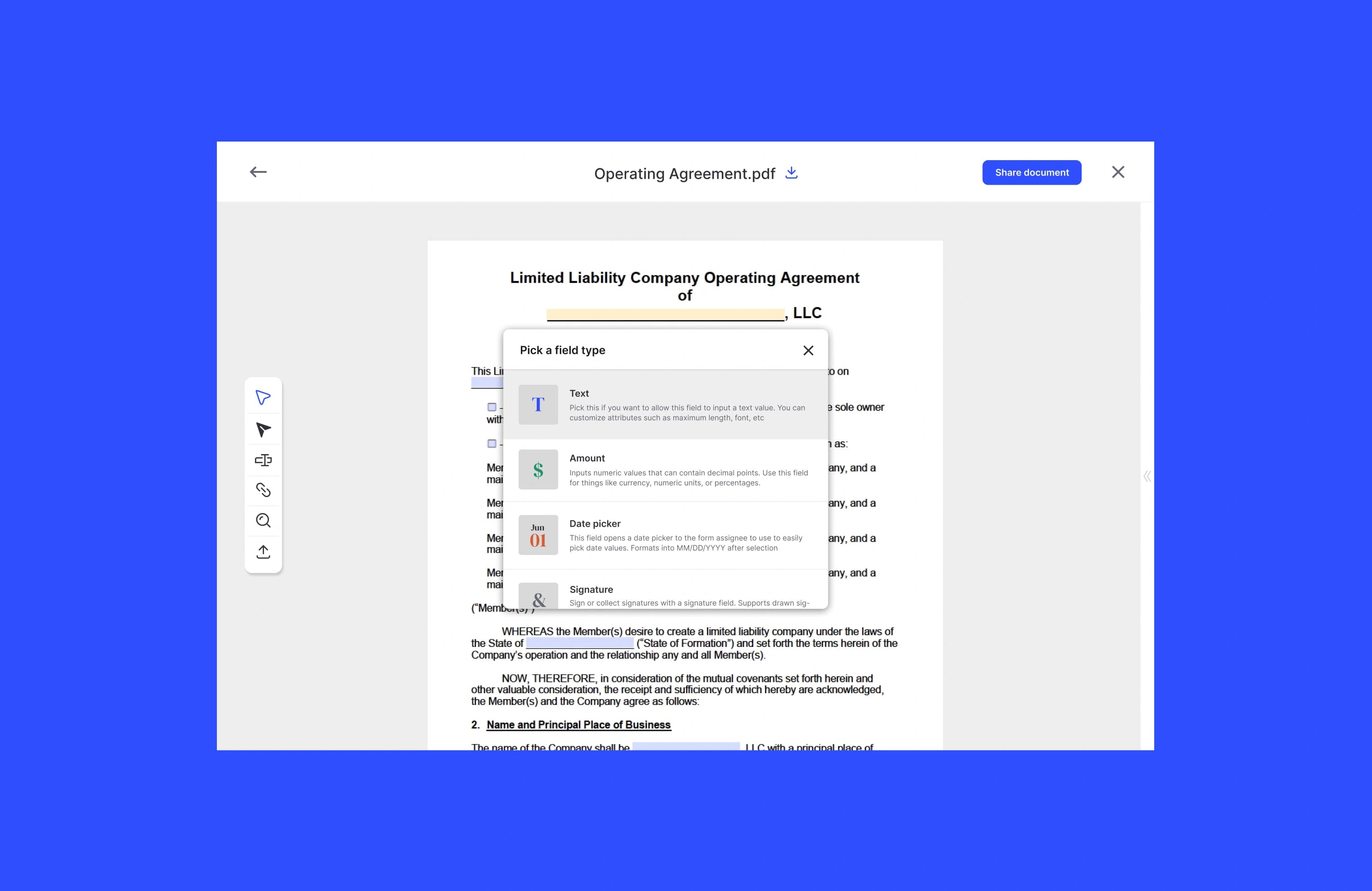
Use a compliant e-sign workflow that records intent, captures signer consent, and generates an audit trail. That combination, not the signature graphic itself, is what makes a digital signature enforceable. Platforms like Formable build these controls into the sending process, so the rest of this guide walks through the practical steps, the legal checklist behind them, and how to integrate signing into your own systems.
TL;DR:
- Ensuring an enforceable e-signature requires recording clear intent, obtaining explicit consent, and maintaining a secure audit trail with timestamps, IP addresses, and document hashes.
- The signing process must include the placement of a consent clause before signing, proper document locking, and secure storage of completed files with retention policies.
- Low-risk documents can rely on simple signatures like typed or drawn marks, but high-risk or regulated transactions may require cryptographic digital signatures or additional identity verification.
- Cross-border signing involves adhering to local jurisdictional laws such as eIDAS in the EU and ensuring data residency compliance, with specific signature tiers required for certain transactions.
- Embedded signing APIs with features like templates, webhooks, and audit trails streamline workflows, especially when integrated into custom products, while mobile responsiveness and appropriate authentication methods are critical for user trust and legal validity.
How do I collect signatures digitally, step by step?
Collecting a signature digitally follows a predictable sequence, and skipping steps is usually what causes disputes later. Vendor workflows from Google Drive's eSignature tool to enterprise contract platforms all converge on the same pattern.
- Lock the final document. Convert your MSA, DPA, SOW, or order form to a final PDF or DOCX before sending it. Identify every signer and the order they need to sign in, especially for multi-party contracts where one signature depends on another.
- Add signature and data fields. Place signature blocks, initials, date fields, and any required data entry (title, company name, effective date) directly on the document. The signature field should sit immediately after the consent clause, not before it, so the signer sees what they're agreeing to before they act.
- Choose authentication and delivery. Decide how signers receive the request: a direct email link, an SMS link, two-factor verification, or in higher-stakes cases, ID verification. The right method depends on how much you need to prove about who actually clicked "sign."
- Send, track, and remind. Configure the request with an expiration date and automatic reminders, then monitor status in real time. Most platforms show you exactly who has opened, viewed, or completed the document.
- Download and archive. Once everyone signs, pull the tamper-evident PDF along with its certificate of completion. SignNow's guide to online signing notes this certificate typically bundles the full audit trail into one file, which matters if you ever need to produce evidence of signing.
- Store with retention rules attached. Move signed documents and their audit records into a secure repository with a defined retention policy, not just a folder on someone's desktop.
Skipping the consent clause placement in step 2 is the single most common mistake teams make, and it's the one most likely to weaken enforceability if a signature is ever challenged.
Electronic signature or digital signature: which do you need?
These two terms get used interchangeably, but they describe different things, and picking the wrong one for the stakes involved can leave you exposed. An electronic signature captures a signer's intent, a typed name, a drawn mark, an uploaded image, or a click on an "I agree" button. A digital signature goes further: it uses cryptographic keys and certificates through a PKI system to verify both the signer's identity and the document's integrity.
Common capture methods break down like this:
- Typed name entered into a signature field, often paired with a checkbox.
- Drawn signature created with a mouse, stylus, or finger on a touchscreen.
- Uploaded image of a handwritten signature scanned or photographed in.
- Click-to-accept for terms of service or low-stakes acknowledgments.
- Certified PKI signatures that embed a cryptographic certificate tied to a verified identity.
For low-risk internal sign-offs like an expense approval or an HR acknowledgment, a typed or drawn signature is fine. For medium-risk commercial contracts, an NDA, a pilot agreement, an order form, a standard e-signature with a solid audit trail usually covers you. For high-risk regulated transactions, such as certain real estate transfers, large financial instruments, or documents requiring notarization, you may still need in-person witnessing, notarization, or additional identity proofing on top of any digital tool.
Pro Tip: Match the signature method to what you'd need to prove in a dispute, not to what looks the most official. A click-to-accept on a low-stakes internal form doesn't need PKI certification, and forcing that level of friction on every document just slows your team down.
What legal requirements make an e-signature enforceable?
Enforceability comes down to four things you need to capture and keep, not to the signature's visual style. Under the framework most guidance in this space references, electronic signatures are legally effective when they capture clear intent to sign, obtain consent to transact electronically, and maintain an audit trail with timestamps, IP addresses, and document hashes.
Break that down into a working checklist:
- Intent. The signer must take a deliberate action showing they mean to sign, not something they could plausibly claim was accidental.
- Consent. The signer must agree to conduct the transaction electronically, usually through a visible consent clause.
- Association. The signature must be tied to the specific document version being signed, ideally via a cryptographic hash.
- Retention. The signed record and its audit trail need to be stored in a way that resists tampering and remains retrievable.
The ESIGN Act at the federal level and the Uniform Electronic Transactions Act (UETA) at the state level are the two frameworks most U.S. e-signature practices trace back to, and they establish that electronic signatures generally carry the same legal weight as ink ones when these conditions are met. For high-value contracts or anything in a regulated industry, get counsel to review your specific workflow rather than relying on general guidance.
Some vendor guidance recommends this exact placement: put the consent statement directly above the signature field, something like "By clicking below, you agree to sign this document electronically and acknowledge that your electronic signature is legally binding." Formstack's guide to collecting electronic signatures treats this ordering as a baseline best practice, not an optional nicety.
Streamlined signing experiences also pay off commercially. a large majority of signers say they're more likely to do business with a company that offers a smooth electronic signing process, so getting this right isn't purely a legal exercise.
What security controls protect a signed document?
A signature is only as trustworthy as the record behind it, which means encryption and access control matter as much as the signature block itself. Data should be encrypted with TLS in transit and AES-256 at rest, and only authorized team members should have access to unsigned drafts or completed originals.
The audit trail is where most of the real evidentiary weight sits. Insist on these fields at minimum:
- Who signed (name, email, and role).
- What was signed (document version, tied to a cryptographic hash).
- When each action happened (precise timestamps for viewing, signing, and completion).
- Where the action originated (IP address and device information).
Document hashing deserves special attention. A SHA-256 hash generates a unique fingerprint of the file at the moment of signing; if even one character of the document changes afterward, the hash changes too. Some platforms let anyone verify that hash independently to confirm nothing was altered post-signature, which is a stronger guarantee than simply trusting a PDF looks unchanged.
Operational controls round it out: defined retention schedules, regular backups, role-based access so only the right people can send or void agreements, and an incident response plan if a breach ever occurs. Formable's approach to these controls is outlined on its security and compliance page.
Pro Tip: Treat a simple image stamp of a signature, dropped onto a PDF with no metadata attached, as a red flag. Without an audit trail behind it, that signature is nearly impossible to defend if someone later claims they never agreed to the terms.
How do you embed e-signing into your own product?
Teams building software that needs signing capability generally choose between three approaches: a hosted signing link you redirect users to, embedded signing where the signature experience loads inside your own application, or a fully API-driven flow where your system generates, sends, and tracks documents programmatically. Embedded signing, often implemented through a pattern like a SignatureRequestUrl, tends to deliver the best user experience because signers never leave your product.
A workable API should give you these features:
- Template creation so repeat document types don't require rebuilding fields each time.
- Prefill capability to populate signer data automatically from your own database.
- Webhooks that notify your system the moment a document is viewed, signed, or completed.
- A downloadable signed PDF bundled with its certificate of completion.
Implementation typically runs: create the template, populate fields programmatically from your data, request a signature link, listen for webhook events, then save the signed file and its audit data to your own storage. Before shipping, test webhook signature validation to block spoofed events, account for time zone handling across signers in different regions, and confirm your retry logic won't create duplicate requests. Formable documents this pattern in its Node.js integration guide for teams building this from scratch. See developer tools for embedded e-signing for SDKs, webhooks, and implementation examples.
How does Formable meet these signing requirements?
Formable's signing product maps directly onto the controls covered above: an embedded signing API built on the SignatureRequestUrl pattern, full audit trails on every document, and redlining tools that let both parties align on terms before anything reaches the signature stage. Documents come back as tamper-evident PDFs, and templates combine with AI-assisted clause insertion so recurring agreements like NDAs or order forms don't need to be rebuilt from scratch each time.
The point isn't that Formable invented these controls. It's that a workflow built with intent capture, consent, hashing, and audit logging baked in from the start is easier to trust than one assembled from disconnected tools after the fact.
How do you handle signatures across international borders?
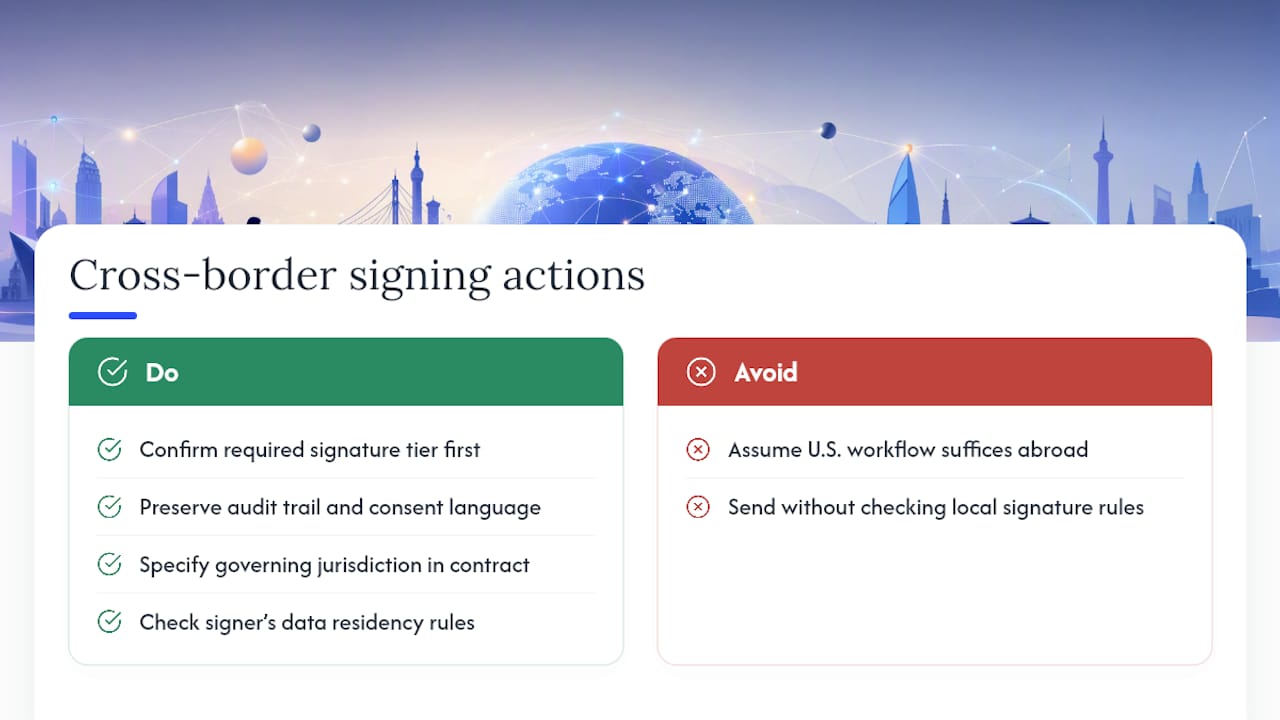
Cross-border signing adds a layer most domestic guides skip entirely, and it trips up teams the first time they send a contract to a signer outside the United States. Signature laws vary by country: the European Union operates under eIDAS, which recognizes tiers of electronic signatures, simple, advanced, and qualified, with qualified electronic signatures carrying the strongest legal presumption. Other countries have their own frameworks, and some regulated transactions still require a locally recognized signature type regardless of what a U.S.-based platform offers.
Practical steps for handling this:
Confirm which signature tier the receiving country's law expects for that document type before you send it. A standard e-signature that's perfectly enforceable for a domestic SOW may not satisfy a qualified-signature requirement in another jurisdiction for certain regulated agreements.
Keep the audit trail language and consent clause in a form that would hold up if the agreement were ever challenged in either party's jurisdiction. Some legal teams draft a jurisdiction clause into the contract itself specifying which country's law governs the agreement, which sidesteps a lot of ambiguity about which signature standard applies.
Watch data residency rules too. If a signer is in the EU, where the signed document and its audit data get stored can matter for GDPR compliance, separate from the signature's legal validity. For any recurring cross-border volume, involve counsel familiar with both jurisdictions rather than assuming a U.S. compliant workflow automatically satisfies foreign requirements.
What does collecting signatures digitally cost?
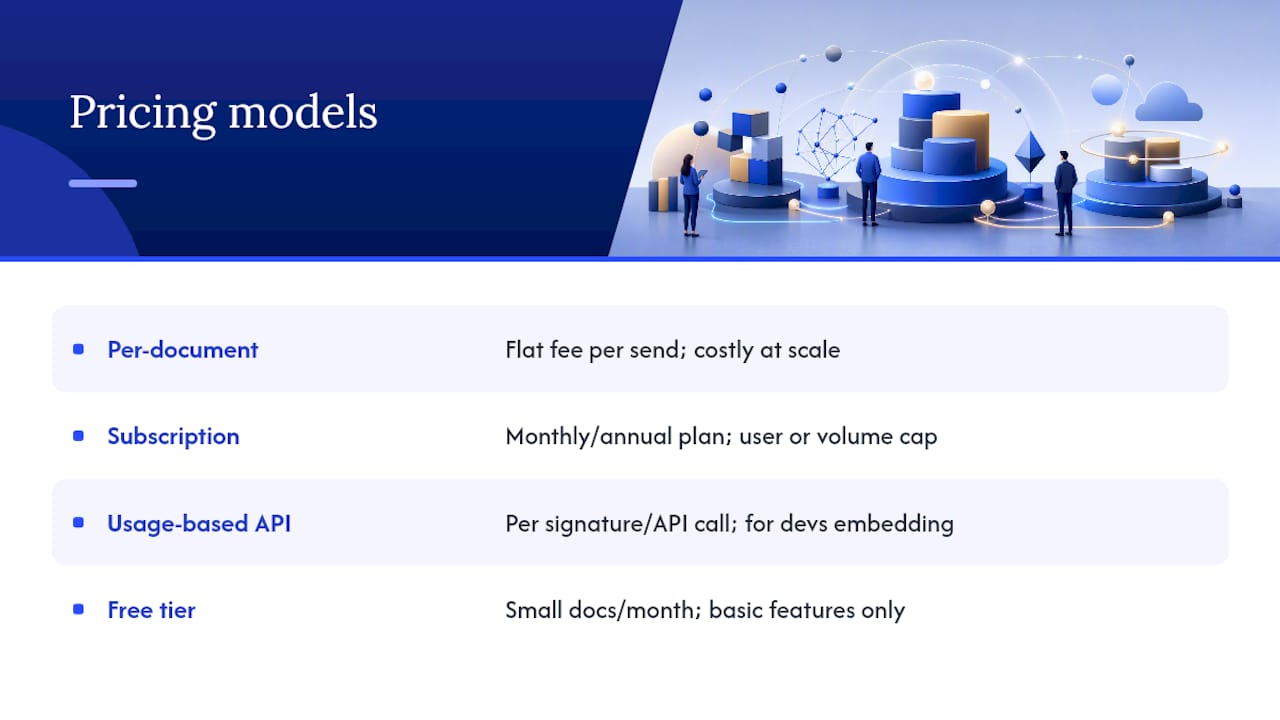
Pricing for digital signature tools generally falls into a few structures, and picking the wrong one for your volume is an easy way to overpay. Per-envelope or per-document pricing charges a flat fee each time you send something for signature, which works well for low-volume users but gets expensive fast once you're sending dozens of contracts a month.
Subscription tiers are more common for teams: a monthly or annual fee covers a set number of users or a set volume of documents, often with feature gates between tiers, template libraries, advanced authentication, or API access sitting behind higher-priced plans. Usage-based API pricing charges per signature event or per API call, which suits developer teams embedding signing into their own product rather than using a hosted interface.
Free tiers exist across most providers, usually capped at a small number of documents per month with basic features only, no advanced authentication, limited templates, or restricted audit trail detail. These work fine for occasional personal use but rarely scale to business needs.
When comparing pricing, look past the sticker price on the plan itself. Ask whether audit trails and certificates of completion are included standard or sold as an add-on, since audit trails should be a baseline feature of any professional e-signature tool, not a premium upsell. Formable's usage-based pricing for API integrations and free tier for individuals and developers reflects that a scaling team needs a different cost structure than someone sending a handful of contracts a year.
Does the signing experience work on mobile devices?
Most signers today complete documents on a phone, often while standing in a hallway or between meetings, so a signing flow that only works well on desktop is going to cost you completed contracts. A well-built mobile signing experience should render the full document legibly on a small screen, let signers draw a signature with a finger, and complete the entire flow without requiring an app download.
Responsive design matters more here than almost anywhere else in the workflow. Signature fields, checkboxes, and consent language need to scale properly rather than forcing a signer to pinch and zoom their way through a contract. Slow load times or documents that render incorrectly on mobile browsers are a common reason signers abandon a request partway through, particularly on longer agreements like MSAs or SOWs with multiple exhibits attached.
Accessibility deserves attention alongside mobile compatibility. Guidance from Section 508 calls for signature capture fields and consent interactions to be keyboard navigable and screen-reader compatible, which benefits mobile users relying on accessibility features just as much as it benefits desktop users. A signing flow that only works with a mouse and a large monitor excludes a meaningful share of potential signers, and for public sector or education-adjacent work, accessibility compliance often isn't optional at all.
What authentication methods verify a signer's identity?
Authentication is the piece that answers "how do you actually know it was them?", and the right level depends entirely on what's at stake in the document. Email-based authentication, where a unique link is sent to a known address, is the baseline for most business documents and works fine for the majority of MSAs, order forms, and standard commercial agreements.
Higher-assurance methods layer on from there. SMS-based two-factor authentication requires the signer to enter a code sent to their phone before they can access the document, adding a second channel that's harder to spoof than email alone. Knowledge-based authentication asks the signer questions only they should be able to answer, drawn from public records or credit history, which shows up more often in real estate and financial transactions. Biometric verification, matching a photo ID to a live selfie, or in some cases a fingerprint or facial scan on a mobile device, provides the strongest identity assurance and tends to appear in regulated industries or high-value transactions where the cost of a fraudulent signature is severe.
The tradeoff runs in one direction: stronger authentication generally means more friction for the signer. A pilot agreement or a routine NDA doesn't need ID verification, but a large commercial lease or a regulated financial contract often should require it. Choosing the right tier isn't about maximizing security everywhere, it's about matching the authentication method to the actual risk the document carries.
Why integrated contract workflows matter to teams
Deals close faster when the entire process, drafting, redlining, and signing, lives in one system instead of bouncing between email threads and a separate signing tool. Fewer handoffs mean fewer disputes about which version was actually signed. My practical takeaway: standardize your templates, capture consent explicitly, and preserve the audit trail on everything, even documents that feel too small to matter. Test the full flow on a low-risk agreement before you trust it with your next MSA.
— Alex
Get a compliant signing workflow running with Formable
Formable gives you the embedded signing API, redlining, audit trails, and AI-assisted templates covered throughout this guide, all inside one platform instead of five disconnected tools. If you're a developer team, the embedded signing API lets you drop a SignatureRequestUrl flow directly into your own product without building signature capture and audit logging from scratch. If you'd rather send agreements through a ready-made interface, the signing product covers templates, tracking, and tamper-evident PDFs out of the box.

For teams that also need consent documentation outside standard contracts, this electronic consent compliance guide is a useful reference for specialized consent requirements. Ready to see how it fits your workflow? Start with the embedded signing API and send your first document today.
Sources
- E-signatures legal requirements | Purdue Global Law School
- Send signature requests & sign documents with eSignature - Google Drive Help
FAQ
How do I digitally capture a signature?
You capture a digital signature by having the signer type, draw, or upload their signature into a designated field within a document, typically after they've viewed a consent clause confirming they agree to sign electronically.
How do I get my signature onto a document digitally?
Open the document in an e-signature tool, locate the signature field, then choose to type your name, draw it with a mouse or touchscreen, or upload an image of your handwritten signature before submitting.
What is the best app for collecting signatures?
The right choice depends on your use case: teams managing full contract workflows, drafting, redlining, and signing together, benefit from a platform like Formable, while simpler one-off documents can use any standard e-signature tool with a solid audit trail.
How do I collect digital signatures for free?
Most e-signature providers, including Formable, offer a free tier for individuals and developers that covers basic document sending and signing, though document volume and advanced features like ID verification are typically limited until you upgrade.