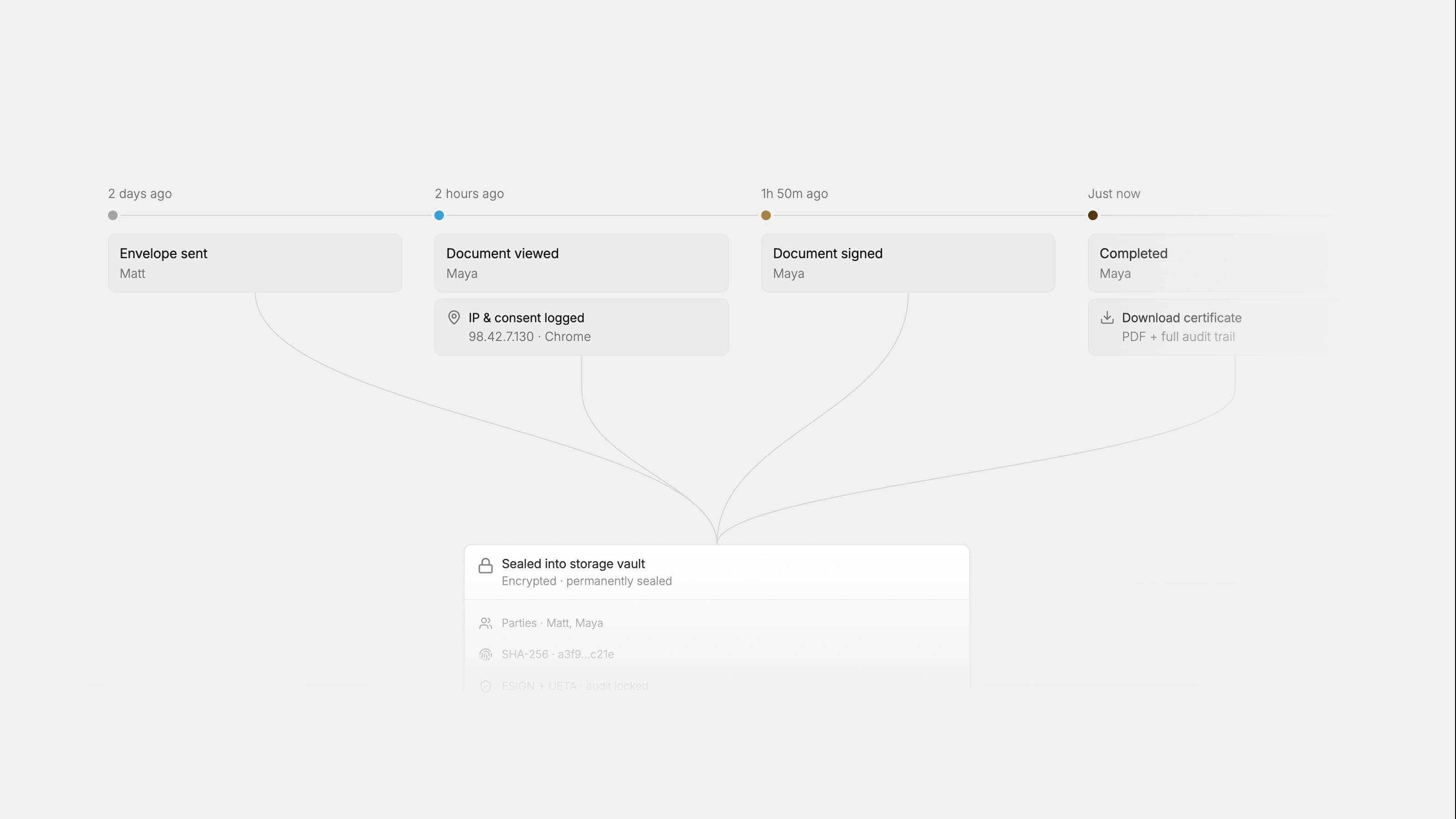
A legal intake workflow is the contract front door: the structured process that captures metadata, triages by risk and value, and routes every incoming NDA, MSA, SOW, DPA, and order form into a review, negotiation, and e-signature pipeline. The single most important first step is to centralize intake as the one enforced path for every agreement request, before adding any automation or AI.
Without that front door, legal teams operate reactively, fielding Slack messages, email attachments, and verbal requests with no consistent metadata, no audit trail, and no way to measure throughput. First-time GC guidance is direct on this point: build a contract management process and a standardized intake system early, or you will drown in ad hoc requests and have no evidence to justify additional resources.
The immediate first step: deploy a single intake form or ticketing path and require it for every request, no exceptions.
Pro Tip: AI needs structured inputs to produce reliable outputs. Teams that layer in AI before fixing how work enters legal are automating dysfunction, not solving it. Fix the front door first.
Key takeaways
A legal intake workflow succeeds when intake is centralized, triage is deterministic, and metrics are tracked from day one.
| Point | Details |
|---|---|
| Centralize first | One intake form or ticketing path must be the only accepted channel for all contract requests. |
| Define four tiers | Map contracts to Tier 0 through Tier 3 by risk and value, with a named reviewer and SLA for each. |
| Start low-tech if needed | Microsoft Forms plus SharePoint provides immediate structure with near-zero software cost. |
| Measure six KPIs | Track throughput, cycle time, SLA compliance, self-serve rate, escalation rate, and time saved. |
| Formable for scale | When volume exceeds the low-tech path, Formable adds AI review, redlining, and e-signing in one platform. |
What every effective contract intake workflow needs
A well-designed contract intake workflow has seven structural components. Missing any one of them creates a gap that grows more expensive as volume increases.
- Central intake channel. One form, one portal, or one ticketing queue. Every request enters through it, with no side channels accepted.
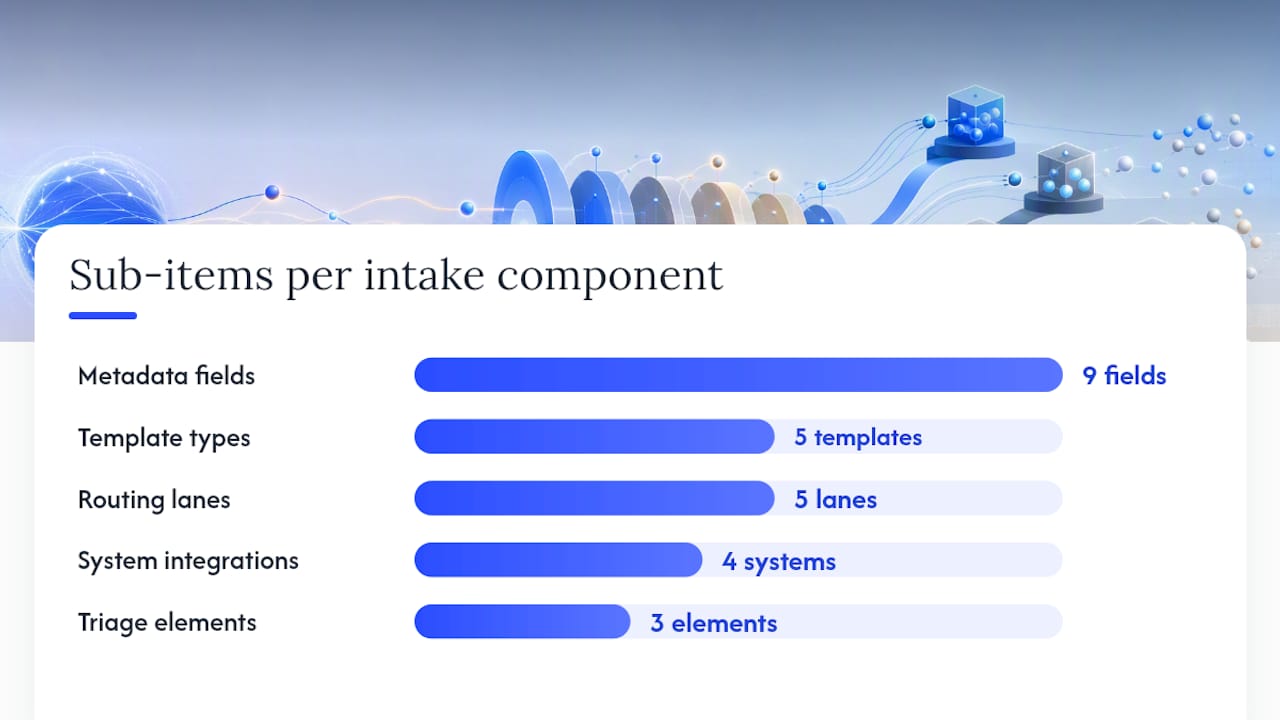
- Standardized template library. Pre-approved templates for NDAs, MSAs, SOWs, DPAs, and order forms reduce drafting time and limit redline scope. Formable's contract creation tool combines templates with generative AI for faster generation.
- Metadata model. Each submission must capture contract type, counterparty legal name, deal or spend value, term start and end, renewal notice date, business owner, department, and requested signature date.
- Triage rules and approval matrix. Deterministic rules that map each submission to a tier, a reviewer, and an SLA. A contract review SOP typically runs 5 to 15 pages and covers triage, playbook positions, and escalation paths.
- System of record integration. The intake output must write into a CLM, CRM, procurement system, or at minimum a document library like SharePoint.
- Routing lanes. Self-serve, legal ops review, in-house counsel, outside counsel, and specialist review (privacy, security, finance) are the standard lanes. Requests route automatically based on tier.
- Governance and audit trail. Every submission, status change, approval, and signature event must be logged with a timestamp and an owner.
Pro Tip: Document your intake edge cases before adding AI. Convert each exception into an acceptance test with deterministic checks and a documented human review packet. This prevents post-launch drift.
What fields should your intake form include?
The goal is to collect everything legal needs to triage and route a request without a follow-up email. A Microsoft Forms plus SharePoint implementation can handle branching logic, metadata tagging, and document library population without custom code.
Minimum required fields:
- Requester name and email
- Business owner and department
- Counterparty legal name and jurisdiction
- Contract type (NDA, MSA, SOW, DPA, order form, other)
- Requested signature date
- Deal or spend value
- Linked CRM opportunity or vendor ID
- Upload of current draft (if counterparty paper)
Optional but high-value fields:
- Product line or business unit
- Business justification
- Renewal notice date
- Privacy or security flags (does this involve personal data or system access?)
- SLA urgency reason
Branching logic examples:
| Contract type selected | Conditional fields triggered |
|---|---|
| NDA | Mutual or one-way; duration; governing law |
| MSA | Payment terms; liability cap; auto-renewal clause |
| DPA | Data categories; sub-processors; transfer mechanism |
| SOW | Deliverables; milestones; acceptance criteria |
| Vendor agreement | Spend threshold; procurement approval required? |
Low-tech forms implement branching with show/hide logic in Microsoft Forms. CLM launch forms handle the same logic with field validation rules and writeback to the system of record.
How to set triage tiers and SLAs that actually hold
Triage is where most startup legal teams lose control. Without written rules, every request becomes urgent and every requester believes their deal is the exception. SOPs that sort contracts into tiers by risk and complexity, and assign SLAs and reviewers per tier, prevent routine work from consuming senior counsel time.
| Tier | Contract profile | Reviewer | Target SLA |
|---|---|---|---|
| 0 (Self-serve) | Standard NDA, pre-approved template, value under $10K | Requester with playbook | Same day |
| 1 (Legal ops) | Low-complexity vendor, value $10K–$50K, standard terms | Legal ops or paralegal | 2 business days |
| 2 (Counsel) | MSA, SOW, DPA, value $50K, counterparty paper | In-house counsel | 5 business days |
| 3 (Senior/outside) | Strategic deal, value over $50K, novel risk, regulated | Senior counsel or outside counsel | Custom |
Encode these rules directly into the intake form or CLM so routing is automatic. A Tier 0 submission should never land in a counsel queue. A Tier 3 submission should trigger an immediate notification to the GC.
Pro Tip: At small headcount, automate Tier 0 and Tier 1 first. Standard NDAs and low-value vendor agreements are high-volume and predictable. Freeing attorney time from those requests is the fastest way to improve throughput without hiring.
Two technology paths: low-tech forms or a full CLM
The right tooling depends on your current contract volume, error rate, and SLA miss frequency. Most teams start on the low-tech path and migrate when the pain becomes measurable.
| Dimension | Microsoft Forms + SharePoint | CLM + API integrations |
|---|---|---|
| Time to launch | Days to 2 weeks | 4 weeks |
| Cost | Near zero (included in Microsoft 365) | Subscription plus implementation |
| Branching logic | Basic show/hide | Full conditional logic with validation |
| CRM writeback | Manual or Power Automate | Native or API |
| AI-assisted review | Not included | Available (e.g., Formable's review engine) |
| Audit trail | SharePoint version history | Immutable event log |
| Best for | Under ~100 contracts/year | 100+ contracts/year or SLA misses |
Low-tech path: Build the intake form in Microsoft Forms with branching logic. Route submissions to a SharePoint document library tagged with metadata (department, contract type, value, renewal date). Use a ticketing tool or shared tracker for follow-up. This path gives immediate structure and visibility with no procurement cycle.
Automated path: A CLM with launch forms, CRM integration, and API-connected e-signing handles routing, AI-assisted extraction, playbook-driven review, and audit logging automatically. The contract workflow management guide covers the full CLM migration in detail.
Move from low-tech to CLM when you hit roughly 100 contracts per year, when SLA misses become frequent, or when metadata errors from manual tagging start affecting reporting.
Pro Tip: Before migrating to a CLM, map your intake channels, required fields, routing logic, and SLAs into a requirements template. That document becomes your vendor evaluation scorecard and your implementation spec.
A 7-step implementation checklist
- Audit current state. Count monthly contract requests by type, map where they enter (email, Slack, verbal), and identify the top five recurring contract types.
- Define metadata model and triage tiers. Agree on required fields and the four-tier SLA matrix before building anything.
- Build the intake form. Start with Microsoft Forms or your CLM's launch form. Include branching logic for the top three contract types.
- Configure the document library or CLM. Set up SharePoint or your CLM with metadata columns matching the intake form fields.
- Run a two-week pilot. Limit to one department. Collect every submission, measure SLA compliance, and log every exception.
- Build the edge-case register. Document every exception from the pilot with its trigger, owner, required evidence, and deterministic resolution rule.
- Train and enforce. Run a 30-minute session for sales, procurement, and finance. Make the intake path the only accepted path. Redirect every side-channel request back to the form.
Rough cost buckets:
- Low-tech (Forms + SharePoint): near zero in software cost; 20–40 hours of internal setup time.
- CLM implementation: subscription cost varies by vendor; implementation typically 40–120 hours depending on integration complexity.
Change management is the most common failure point. The intake form must be simpler for the requester than sending an email. If it is not, adoption will fail regardless of enforcement.
Which metrics prove your intake workflow is working?
Measure these six KPIs from day one. They are the evidence base for headcount requests and CLM investment decisions.
- Throughput: contracts processed per week or month, by tier
- Average cycle time per tier: calendar days from submission to signature
- SLA compliance rate: percentage of requests completed within the target SLA
- Self-serve rate: percentage of Tier 0 requests completed without legal involvement
- Escalation rate: percentage of requests that moved up a tier after initial triage
- Time saved per request: estimated attorney hours avoided by self-serve and automation
Research from Checkbox.ai found that 42% of legal team attendees in a webinar prioritized handling repetitive requests as their top automation goal. That figure reflects how much attorney time routine intake consumes before any structure is in place.
Report throughput and SLA compliance to the GC weekly. Share cycle time trends with sales leadership monthly. Bring self-serve rate and time-saved estimates to finance when requesting headcount or software budget.
| Metric | Reporting audience | Cadence |
|---|---|---|
| Throughput by tier | GC, legal ops | Weekly |
| SLA compliance rate | GC, sales leadership | Weekly |
| Average cycle time | Sales leadership, finance | Monthly |
| Self-serve rate | GC, finance | Monthly |
| Escalation rate | GC, legal ops | Monthly |
Governance, security, and retention basics
Access control and audit logging are not optional. They are the foundation that makes intake data usable for compliance reviews and defensible in disputes.
Minimum governance requirements:
- Role-based access: requesters submit, legal ops review, counsel approve, admins configure.
- Approval matrix documented and version-controlled.
- Immutable audit log capturing every submission, status change, comment, and signature event with a timestamp and user ID.
- Ownership fields on every contract record (business owner, legal owner, renewal owner).
Security controls:
- File scanning on all uploads before storage.
- Secure upload links rather than email attachments.
- Least-privilege access to the document library or CLM.
- Vendor metadata checks for third-party paper submissions.
Retention: Align intake records with your downstream CLM and corporate retention policy. Most US companies retain executed contracts for 7 years minimum; regulated industries often require longer. Intake submissions should carry the same retention tag as the resulting contract.
Privacy: Capture only the personal data fields the intake process genuinely requires. Route any submission flagged as a DPA or involving personal data categories directly to a privacy reviewer. Keep sensitive attachments in a secured repository separate from the general intake queue.
Pro Tip: Keep PII in intake forms to the minimum necessary. Counterparty legal name and jurisdiction are required. Individual contact names and personal emails are often not. Collect them at the contract level, not the intake level.
How Formable handles the full intake-to-signature pipeline
Formable maps directly to every stage of the contract intake workflow: intake capture, AI-assisted review, collaborative redlining, and e-signing, with a full audit trail across all events.
Common deployment patterns:
- Quick start: Use Formable's template library to generate standard NDAs, MSAs, and SOWs. Route counterparty paper through the review engine to catch risks and missing clauses against your playbook automatically.
- Negotiation and sign: Send agreements for redlining through Formable's negotiation tool, where both parties align on terms before moving to e-signature. No version-control confusion, no emailed redlines.
- API integration: Embed Formable's e-signing and redlining APIs into your CRM or deal desk workflow so contracts move from intake to signature without leaving the tools your sales team already uses.
Benefits by stakeholder:
- Sales and GTM: faster turnaround on NDAs and order forms, fewer back-and-forth cycles.
- Legal: playbook-driven AI review flags risks at intake, not after negotiation.
- Finance: auditable records with timestamps on every approval and signature event.
Formable suits teams that have outgrown the Microsoft Forms plus SharePoint path and need AI-assisted review, redlining, and e-signing in a single platform. If you are still under 50 contracts per month and have no SLA misses, the low-tech path is a reasonable starting point. When volume grows or errors accumulate, Formable is the recommended next step.
What most teams get wrong about intake implementation
The most common mistake is scope creep at launch. Teams try to solve every edge case in the first version of the form, end up with a 40-field intake questionnaire, and watch adoption collapse within two weeks. Start with the minimum viable field set: eight to ten fields that legal genuinely needs to triage the request. Add fields only when a missing one causes a measurable delay.
The second mistake is treating enforcement as a technology problem. No CLM or form tool enforces itself. Someone with authority, usually the GC or legal ops lead, must redirect every side-channel request back to the intake form, consistently, for the first 60 days. After that, the behavior becomes habit.
A weekly audit sample of 10 to 15 recent submissions will surface drift faster than any dashboard. Pull the sample on a fixed day, check for missing metadata, SLA misses, and requests that bypassed the form. Address each exception in writing so the edge-case register stays current.
Change management is not a training event. It is a sustained enforcement posture for the first quarter.
Formable makes the intake-to-signature path concrete

Formable is built for the team that has decided to stop managing contracts through email threads and shared drives. From the moment a request comes in, Formable's contract review engine reads the agreement against your playbook and flags risks automatically. Redlining happens inside the platform, both parties see changes in real time, and the deal moves to e-signature without leaving the workflow. Every event is logged with an immutable timestamp.
Reach out at Formabledocs and the team will walk through your current intake setup and show you exactly where Formable fits.
Sources
- Contract review SOP — ooligo
- The Front Door Problem Undermining Your Legal AI Investment
- Contract Intake Automation Requirements Template for Legal Operations Teams | Red Brick Labs Blog
- Legal Contract Submission Form library for SharePoint
This article is general information, not a substitute for advice from a qualified lawyer. Consult a qualified legal professional about your own circumstances before acting on anything here.
FAQ
What is a legal intake workflow for contracts?
A legal intake workflow is the structured process for receiving, triaging, and routing incoming contracts into a review, negotiation, and e-signature pipeline. It captures required metadata at submission and routes each request to the right reviewer based on risk and value.
How do I build a contract intake workflow without a CLM?
Use Microsoft Forms with branching logic to collect metadata and a SharePoint document library to store and tag submissions. This low-tech path provides immediate structure and visibility with no additional software cost, and it scales to roughly 100 contracts per year before a CLM becomes necessary.
What fields should a contract intake form include?
At minimum: requester, business owner, department, counterparty legal name, contract type, requested signature date, deal value, jurisdiction, and a draft upload field. Branching logic then surfaces contract-type-specific fields such as data categories for DPAs or payment terms for MSAs.
When should a startup move from a manual intake process to a CLM?
Move when you reach roughly 100 contracts per year, when SLA misses become frequent, or when metadata errors from manual tagging start affecting reporting accuracy. Formable is a practical next step for teams at that threshold.
How does Formable support a legal intake workflow?
Formable covers intake-to-signature in one platform: AI-assisted contract review against your playbook, collaborative redlining, and e-signing with an immutable audit trail. It also offers APIs for embedding signing and negotiation directly into CRM or deal desk workflows.