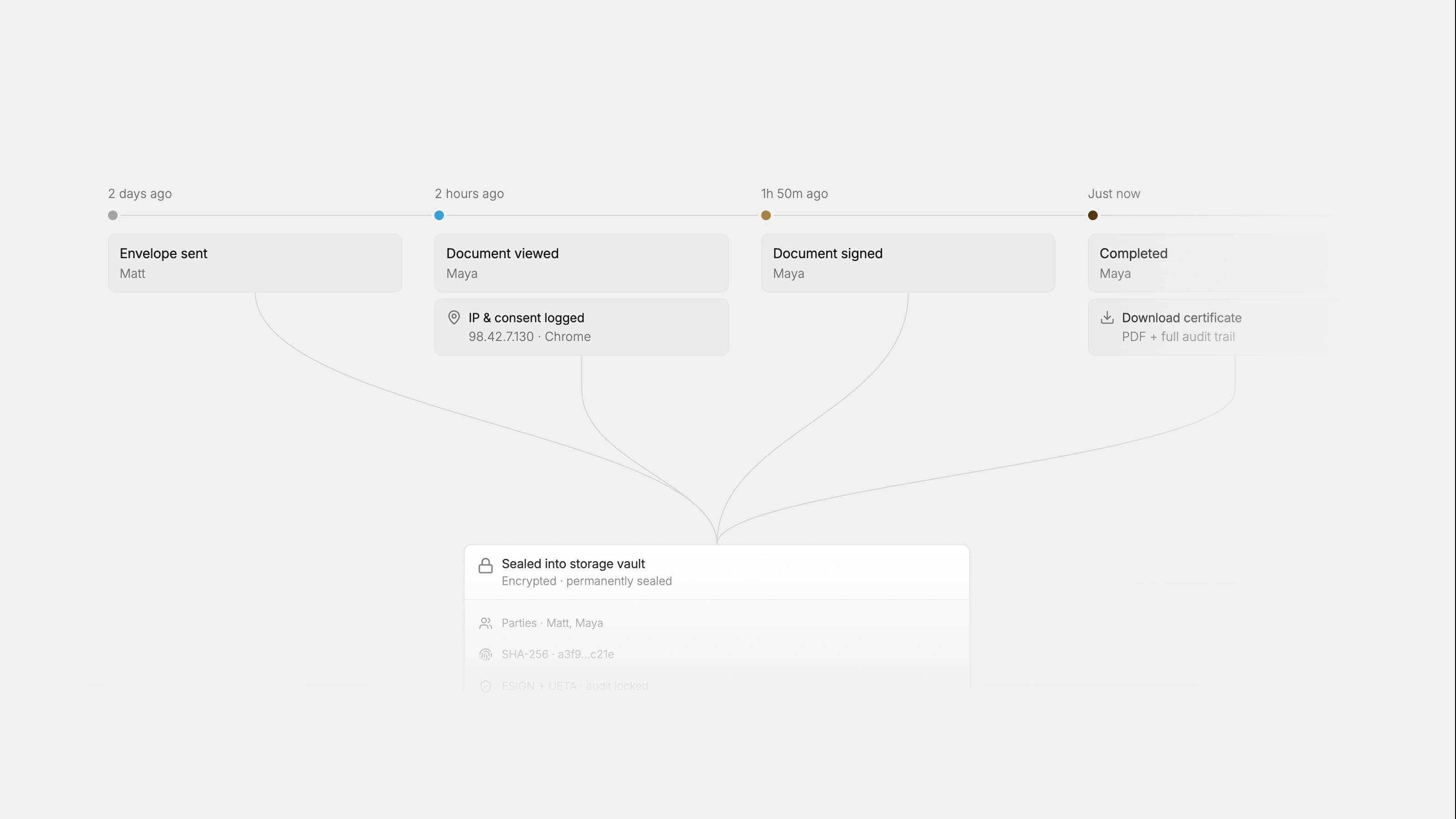
An approved SOW is only worth what matches the signed document, and no contractor work should start until owners, acceptance criteria, payment triggers, and change control are all locked. The fastest, safest workflow runs intake first, then routes delivery, commercial, and legal review in parallel, then sends the final draft to one authorizer before signature and archival.
TL;DR:
- Most SOW approvals should include checks on scope clarity, enforceable payment terms, acceptable legal risk, and realistic delivery timelines before any work begins.
- Approvals must involve defined decision owners for each review lane, scaled by the project's dollar value and risk, with escalation for nonstandard clauses.
- Parallel review routes for delivery, legal, finance, and commercial teams significantly reduce cycle times compared to sequential approvals.
- Lock the draft after final approval and before signature to prevent unauthorized edits, maintaining an immutable audit trail that matches the signed SOW.
- Start process improvements with mandatory, complete intake forms and parallel review lanes to address the most common delays before tackling policy or software changes.
What is the sow approval process and when does it apply?
The SOW approval process is the formal path a statement of work travels from first draft to signed, executable document. Its job is to confirm four things before anyone starts billable work: the deliverables are clear, the payment terms are enforceable, the legal and security risk is acceptable, and the delivery timeline is realistic. Skip any of those checks and you get the classic mess: a contractor invoicing for work nobody agreed to, or a legal team discovering unlimited liability language after the ink is dry.
Not every engagement needs the same rigor, but certain triggers should always kick off a formal review:
- A brand-new vendor or engagement with no prior SOW history
- Any amendment that touches scope, price, or timeline
- Spend above your organization's threshold for single-signature approval (where required by policy)
- Nonstandard terms, such as custom IP assignment or altered liability caps
- Public-sector procurement, where SOWs often require submission before solicitation
That last point matters more than most private-sector teams realize. Government agencies frequently mandate SOW review as a distinct, separate step from general contract approval, sometimes through a dedicated portal. SOW approval also differs operationally from master service agreement (MSA) review: the MSA sets the legal framework once, while each SOW under it gets its own review because the deliverables, price, and schedule change every time.
Who approves a sow, and what does each lane actually check?
Most SOW approval procedures fail not because of missing policy but because nobody defined who owns which decision. A workable structure assigns each reviewer a specific, non-overlapping job:
- Business sponsor or requester confirms the work solves a real business need and the budget exists.
- Delivery or project manager checks that deliverables, milestones, and acceptance criteria are technically achievable on the proposed schedule.
- Sales or deal desk (for revenue-side SOWs) verifies pricing aligns with the quote and any discount approvals.
- Finance validates invoice fields, payment triggers, and that the payment schedule matches milestones, not just a flat monthly fee with no deliverable tied to it.
- Legal or risk reviews IP ownership, liability caps, indemnification, and any clause that deviates from your standard MSA.
- IT or security signs off when the SOW grants vendor access to systems, data, or facilities.
- Final authorizer holds signing authority and confirms every prior lane closed out clean.
Approval levels should scale with dollar value and risk, not headcount. A $15,000 SOW with a known vendor might need only delivery and finance sign-off. A $250,000 SOW touching customer data should route through legal and security automatically, with a named executive as final authorizer. Configurable approval workflows let you set these thresholds once and stop re-deciding them on every deal.
Steps for sow approval: intake through signature
A reproducible workflow beats a well-intentioned one every time. Here's the sequence that holds up under audit and under pressure.
- Intake. Require a standard submission form before anything routes anywhere. Capture the business owner, budget, timeline, contractor name, deliverables list, acceptance criteria, and the exact invoice fields finance needs (PO number, milestone name, amount). Reject incomplete submissions at the door instead of discovering gaps mid-review.
- Parallel routing. Send the draft to delivery, commercial, and legal review simultaneously rather than one after another. Orchestrating reviews across delivery, sales, legal, and finance at the same time is the single biggest lever for cutting cycle time, because sequential-only routing turns a three-day review into a nine-day one for no added rigor.
- Vendor collaboration. Decide upfront whether the contractor gets edit access or view-only review rights. For a first-time vendor, keep edits internal and share a locked draft for comment. For an established partner with a proven SOW template, allow direct redlining to skip a round trip. Either way, vendor approvers should sit at their own level in the workflow, distinct from internal approvers.
- Exception handling. Route anything nonstandard (unusual IP terms, uncapped liability, an unfamiliar contractor entity) to a named escalation owner instead of letting it stall in a generic queue.
- Final authorization. One person signs off once every lane clears. Don't let "mostly approved" count as approved.
- Signature and storage. Lock the approved draft before sending for signature so nothing changes between authorization and execution. Archive the fully executed SOW with metadata (approval date, approver names, linked purchase order) so it's instantly matchable against invoices later.
Pro Tip: Lock the document the moment final approval happens, not after signature. A shockingly common failure mode is someone editing "one small typo" in the draft after approval and before signing, which quietly invalidates the whole review trail.
Getting the sequence right the first time saves you from rebuilding it after a dispute forces the question.
The sow evaluation criteria reviewers check before signing
Reviewers work faster and more consistently when they're checking against the same list every time, rather than reading each SOW cold. The core sections any reviewer should look for:
- Background and purpose (why this engagement exists)
- Scope of work and explicit exclusions
- Deliverables, described concretely enough to test
- Acceptance criteria for each deliverable
- Schedule and milestones
- Pricing, payment triggers, and invoice fields
- Roles and points of contact on both sides
- Change control procedure
- Termination rights and notice periods
- Data handling and security requirements
- Service level agreements, where relevant
- Warranties
- Signature blocks with named signatories
Acceptance criteria cause more disputes than any other section, mainly because teams write them vaguely. "Website redesign complete" is not testable. "Homepage, five interior pages, and checkout flow pass responsive design QA on Chrome, Safari, and mobile Safari, with client sign-off within five business days of delivery" is. Legal reviewers consistently flag vague deliverables and missing change management as the top drivers of scope creep, and objective, testable criteria is the fix.
Payment triggers need the same treatment. Instead of "monthly retainer," tie each invoice to a completed, accepted milestone: "Invoice #2 issued upon written acceptance of Deliverable B, due net 30." Finance teams can auto-match invoices against milestones only when the SOW spells this out in advance. California's state procurement guidance goes further, requiring defined acceptance and rejection processes with explicit review timeframes so nobody can sit on a deliverable indefinitely without formally rejecting it.
When does a sow need to be reapproved?
Not every tweak to a signed SOW requires a full re-run through every lane, but certain changes always do: anything touching scope, schedule, budget, or legal terms that shifts risk or delivery. A one-week schedule slip with no cost impact might get a lightweight sign-off from the delivery manager alone.
A minimal change request should capture:
- Reference to the original SOW (number, date, parties)
- The specific change requested
- Rationale for the change
- Cost and timeline impact
- Approving owner
- Contractor acknowledgment
- Date of approval
Version drift, where the "approved" copy and the actual signed copy quietly diverge, is one of the most common and least discussed failure points in SOW governance. The fix is procedural: lock the draft the moment it's approved, and treat any post-approval edit as a new change request rather than a quiet correction.
Pro Tip: Keep a single, immutable audit trail per SOW rather than a folder of "SOW_v2_FINAL_final.docx" files. If you can't reconstruct exactly what was approved and when, you don't actually have a change control process, just a paper trail with gaps.
Why does sow approval slow down, and how do you expedite it?
Most delays trace back to a handful of repeat offenders. Incomplete intake forces reviewers to chase basic facts before they can even start. Missing or vague acceptance criteria bounce a draft back and forth between delivery and the business owner. Finance often reviews last, discovering payment-term problems only after legal and delivery already signed off, forcing a restart. Sequential-only routing stacks review times end to end instead of running them together. And version drift means someone eventually has to figure out which draft actually got approved.
The fixes are mostly structural, not cultural:
- Make intake forms mandatory and block submission until required fields are filled.
- Route delivery, commercial, and legal review in parallel, not in sequence.
- Set reviewer SLAs (48 hours is common) with automated reminders when a lane goes quiet.
- Lock the version before final approval so nothing shifts between sign-off and signature.
- Define access and security requirements upfront so IT isn't a late surprise.
By the numbers: State procurement frameworks like California's SIMM 180 formalize acceptance and rejection cycles with explicit review timeframes to prevent stalled sign-off.
Track cycle time from submission to final signature, SLA adherence per lane, and the percentage of SOWs that require rework after initial submission. Those three numbers tell you exactly where your process is bleeding time.
How Formable operationalizes every stage of sow approval
Every control described above maps directly to a feature, not a policy memo nobody reads. Formable's contract creation tool combines SOW templates with generative drafting, so intake starts from a structure that already contains scope, acceptance criteria, and payment fields instead of a blank page.
Formable's review engine lets teams upload playbooks that automatically flag nonstandard clauses, like uncapped liability or unusual IP assignment, the moment a draft enters review. That turns a manual legal read-through into an automatic first pass. Routing runs in parallel by design: delivery, commercial, and legal reviewers can work the same draft simultaneously, with redlining that lets both your team and the contractor align on terms before anyone reaches signature.
Once approved, e-signature and embedded signing APIs close the loop, and every approval, edit, and signature event lands in an immutable audit trail. That's what makes the signed document provably match the approved draft, which is the entire point of running a formal process in the first place.
Practical configuration examples worth setting up in week one: an intake form that won't submit without acceptance criteria filled in, a routing rule that auto-escalates anything over your risk threshold to legal, and a playbook flag for any SOW containing IP language outside your standard template.
How the review actually moves from draft to final sign-off
Every SOW approval procedure, whether formal or ad hoc, passes through four recognizable stages. The draft stage is where the business owner and delivery lead translate a verbal agreement into scope, deliverables, and a proposed schedule. This is the cheapest point to catch a vague deliverable, because fixing "improve the website" before it hits review costs nothing; fixing it after legal has already signed off costs a rewrite and a delay.
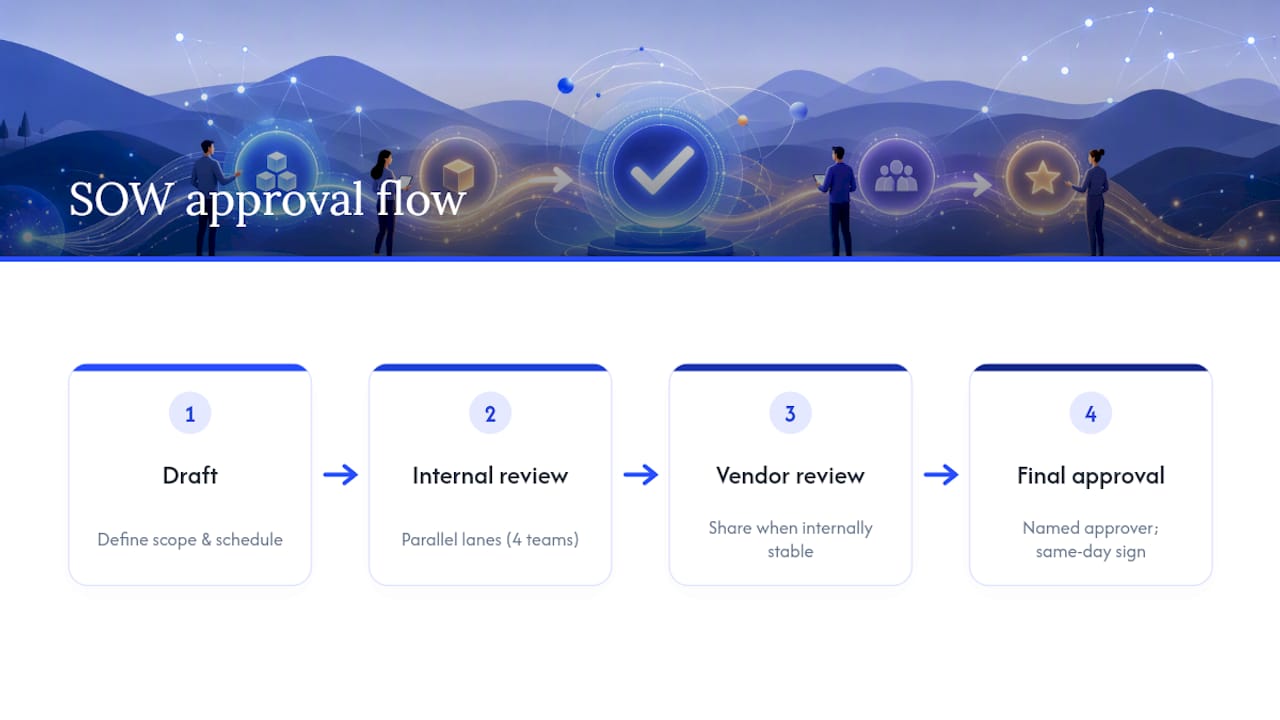
Internal review is where the parallel lanes, delivery, commercial, legal, and finance, check the draft against their own criteria. This is also where most organizations quietly default back to sequential review out of habit, even when their policy says parallel. Watch for that drift; it's the single easiest efficiency gain to lose.
Vendor review comes next, once the internal draft is stable enough to share externally. Some teams open this stage too early, sending contractors a document still missing acceptance criteria, which just generates redline noise. Share only once the internal draft is structurally complete, even if pricing details are still being finalized.
Final approval is the single authorization point where one named person confirms every prior lane cleared and signs off. This stage should be fast, often same-day, because if it isn't, that usually means the earlier stages didn't actually finish their job. A final approver spending a week re-litigating scope means the draft or internal review stage failed, not the approval stage.
Ready to run your next sow through a workflow that holds up under audit
Formable gives teams a way to enforce every control this article walks through without building a manual process from scratch. Intake fields, parallel routing by lane, playbook-driven risk flags, and redlining all live in one workflow, so the SOW that gets signed is provably the SOW that got approved, not a document that quietly drifted somewhere between legal's redline and the final PDF.

Start from a statement of work template built to enforce acceptance criteria and payment fields from the first draft, or go straight to the SOW contract creator to generate one with your own terms already structured in. If you want to see how routing, redlining, and e-signature fit together for your specific approval chain, schedule a walkthrough at Formable and bring your current SOW template to the call.
Where to check your process against outside standards
For public-sector work, review the Texas DIR SOW submission process, which requires agency SOWs above certain thresholds to go through DIR before solicitation, and California's CDT SIMM 180 guidelines for required sections and change control. For private contracting, a SOW review checklist from ContractsCounsel covers the legal terms worth a second look before signature.
Author's take: fix intake before you touch anything else
If you're rebuilding your SOW approval process this quarter, start with intake, not signatures. A locked-down intake form that refuses incomplete submissions solves more delay than any new approval software will on its own. Pair it with parallel review lanes and you've addressed the two biggest sources of friction without touching legal policy at all.
Share your worst SOW approval bottleneck with your team this week; the pattern is almost always the same one everyone already suspects but never fixed.
— Alex
Sources
- SOW review: key terms, legal checks, importance of lawyers | ContractsCounsel
- Statement of Work (SOW) process | Texas Department of Information Resources
- Concept: Statement of Work Approval Workflows | Workday VNDLY docs
FAQ
What comes first, RFP or SOW?
The RFP comes first. It solicits proposals from vendors, and the winning vendor's proposal becomes the basis for the SOW, which then goes through its own separate approval process.
What is a SOW approval process?
It's the structured review a statement of work goes through, typically intake, parallel delivery/commercial/legal checks, and final authorization, before signature, to confirm scope, price, and risk are all acceptable.
Does a SOW need to be signed?
Yes. A SOW is only enforceable once signed by authorized representatives from both parties, and no contractor work should begin until the signed version matches the approved draft exactly.
What does SOW mean in a proposal?
In a proposal context, SOW stands for statement of work, the document that defines deliverables, timeline, and acceptance criteria for the specific engagement being proposed, distinct from the broader master agreement.