
A clause library is a centralized, searchable repository of preapproved contract clauses used to speed drafting and reduce legal risk. Every clause in the library has been reviewed, approved, and tagged so legal teams can find and insert it without starting from scratch. The result is faster drafting, consistent language across every agreement, and a defensible record of what language your organization actually approves.
The primary users are in-house legal teams, contract managers, procurement, law firms, and commercial operations. Sales and HR teams also benefit when they can access preapproved language without routing every request back to legal.
Key takeaways
A clause library is only as valuable as the governance model behind it: ownership, versioning, and integration with drafting tools determine whether it gets used or ignored.
| Point | Details |
|---|---|
| Definition | A clause library is a centralized, searchable repository of preapproved contract clauses with metadata for fast retrieval. |
| Core metadata fields | Every entry needs an ID, risk level, jurisdiction, version, approver, and fallback clause ID to be governable. |
| Start narrow | Build with ten to fifteen high-priority clauses first; expand based on reuse data, not assumptions. |
| Integration drives adoption | Clause libraries accessible inside Word or a CLM get used; standalone repositories do not. |
| Governance is ongoing | Assign a named owner, set a review cadence, and track reuse rate and exception rate from day one. |
Why clause libraries matter for legal teams and contract operations
The operational case for a clause library is straightforward: every hour a lawyer spends rewriting a standard indemnity clause is an hour not spent on higher-value work. Beyond time, the risk case is equally clear. When different attorneys draft the same clause differently, the organization ends up with inconsistent obligations across its contract portfolio.
Key benefits legal teams report after implementing a clause library:
- Drafting speed. Attorneys pull preapproved language rather than drafting from memory or hunting through old contracts.
- Consistency. Every agreement uses the same approved text for standard positions, reducing variation that creates compliance exposure.
- Shorter negotiation cycles. Preapproved fallback positions let teams respond to counterparty redlines without waiting for senior review on every change.
- Cleaner handoffs. Contract managers and business teams can self-serve on routine agreements, freeing legal for complex matters.
- Auditability. A centralized clause library creates a record of which language was approved, by whom, and when.
To measure ROI, track time per contract draft, number of redline rounds per negotiation, approval cycle time, and compliance incidents tied to nonstandard language. These four metrics give you a before-and-after picture that is easy to present to leadership.
How does a clause library actually work?
A clause library is not just a folder of Word documents. Each entry is a structured record with several canonical elements.
Clause text and variables. The core is the approved clause text, often with placeholders for deal-specific values. A liability cap clause might read: "Supplier's total liability shall not exceed [LIABILITY_CAP_AMOUNT] in the aggregate during any [LIABILITY_PERIOD] period." The bracketed tokens are variables that get populated at drafting time.
Fallback language. Most libraries store a primary position and one or more fallback positions. When a counterparty rejects the primary text, the system or the attorney selects the next approved fallback rather than improvising. This is where a well-structured clause library pays off in negotiation speed.
Metadata fields. Each clause entry is indexed by fields that govern how it is found and used. Standard metadata includes:
- Category (e.g., indemnity, confidentiality, payment)
- Risk rating (low / medium / high)
- Jurisdiction (US, EU, global)
- Contract type (MSA, NDA, SOW, DPA)
- Author and approver
- Version number and date
- Tags for search
- Approval status
Insertion mechanics. In a purpose-built tool, a drafting attorney searches by category or keyword, selects the appropriate clause, and inserts it into the document. The system records the clause ID and version used, creating an audit trail. In a CLM-integrated environment, clause insertion can be triggered automatically based on the contract type or a risk flag.
A good clause library classifies clauses by contract type, risk level, and regulatory requirements, and requires periodic updates to stay compliant. That classification layer is what separates a library from a simple text archive.
Common clause categories and short examples
Standard contract clauses fall into recognizable categories. Knowing these categories is the first step to building a useful taxonomy.
- Indemnification. One party agrees to compensate the other for specified losses or claims.
- Confidentiality. Restricts disclosure of proprietary information shared during the relationship.
- Limitation of liability. Caps the total damages one party can recover from the other.
- Termination. Defines the conditions and notice requirements for ending the agreement.
- Intellectual property. Allocates ownership of work product, inventions, and licenses.
- Data protection. Addresses data handling obligations, often required for DPAs and vendor agreements.
- Payment terms. Sets invoicing timelines, late fees, and dispute resolution for billing.
- Force majeure. Excuses performance when extraordinary events make it impossible.
Sample clause snippet (limitation of liability, primary position):
Public clause collections can reach significant scale. HAQQ's contract clause library indexes over 700 real clause examples sourced from SEC EDGAR filings, which gives legal teams a useful benchmark for how standard language actually reads in executed agreements.
When to keep multiple alternates vs. consolidate. Maintain separate alternates when the risk profile genuinely differs (e.g., a mutual indemnity vs. a unilateral one). Consolidate when two versions are functionally identical and the difference is cosmetic. Too many alternates create decision fatigue and undermine adoption.
Home-built vs. purpose-built clause library software
Teams typically start with one of two approaches: a home-built solution using spreadsheets and shared folders, or a purpose-built clause management tool.
Home-built (spreadsheets and Word folders)
Pros: Zero additional cost, fast to set up, no vendor onboarding, familiar to most teams.
Cons: No version control, poor searchability, no approval workflow, no audit trail, difficult to enforce governance, breaks down quickly as volume grows.
A spreadsheet works for a team managing fewer than 50 clauses with one or two users. Beyond that, the maintenance burden typically outweighs the savings.
Purpose-built clause library software
Pros: Structured metadata, version control, approval workflows, role-based access, integration with CLM and word processors, audit trail, search by risk level or jurisdiction.
Cons: Requires implementation time, vendor cost, and change management to drive adoption.
Decision checklist. Consider purpose-built tooling when:
- Your team manages more than 50 active clauses across multiple contract types.
- You need approval workflows and version history for compliance purposes.
- You want to integrate clause insertion into a CLM or Word add-in.
- You have multiple users who need role-based access (read vs. edit vs. approve).
- You need to track which clause version was used in a signed agreement.
Security and access control are often the deciding factor. Home-built solutions in shared drives offer little control over who can edit approved language. Purpose-built tools enforce permissions at the clause level, log every change, and restrict editing to authorized owners. For teams handling regulated contracts (DPAs, financial agreements, healthcare), that control is not optional.
For guidance on selecting legal tooling, the best legal document management software comparison covers evaluation criteria that apply directly to clause library selection as well.
How to build a clause library that will actually get used
A clause library that nobody uses is just a filing system. The build process matters less than the adoption process.
Step-by-step playbook
- Inventory existing clauses. Pull the last 50 to 100 executed contracts and extract every clause that appears more than twice. These are your candidates.
- Define your taxonomy. Agree on category names, risk levels, and jurisdiction tags before you write a single entry. Changing taxonomy later is expensive.
- Prioritize by volume and risk. Start with the five to ten clause types that appear in the most contracts and carry the highest risk (indemnity, liability cap, data protection, termination, confidentiality).
- Draft and review. Have the responsible attorney draft the primary and fallback positions. Route through the approval chain and document sign-off.
- Tag and version. Assign a unique ID, set version to 1.0, record the approver and date, and add all metadata fields before publishing.
- Pilot with one team. Roll out to one practice group or one contract type first. Collect feedback before a full launch.
Rollout checklist
- Assign a named library owner with authority to approve changes.
- Define approval gates: who can propose, who can approve, who can publish.
- Run a 30-minute training session for every user group.
- Build a feedback channel (a shared inbox or a Slack channel) so users can flag stale or missing clauses.
- Set a 90-day review checkpoint to assess reuse rates and gaps.
Pro Tip: Set the most commonly used clause as the default in your drafting template. Attorneys are far more likely to use approved language when it appears automatically than when they have to search for it.
Governance, maintenance cadence, and the KPIs to track
A clause library without governance degrades quickly. Approved language becomes outdated, ownership becomes unclear, and teams start bypassing the library entirely.
Governance checklist
- Named owner. One person is accountable for the library's accuracy and completeness.
- Change windows. Define when clauses can be updated (e.g., quarterly review cycles, or immediately for regulatory changes).
- Approval workflow. Every change requires review by the responsible attorney and sign-off by the library owner before publishing.
- Versioning. Increment the version number on every approved change. Never overwrite a prior version.
- Audit trail. Log every edit, approval, and publication event with a timestamp and user ID.
Classifying clauses by risk level and updating them regularly is what keeps a library compliant rather than just convenient.
KPIs to track
- Clause reuse rate. Percentage of contracts that use at least one library clause. Tracks adoption.
- Exception rate. Percentage of contracts where a non-library clause was used. Tracks deviation.
- Time to draft. Average time from contract request to first draft. Tracks speed improvement.
- Approval turnaround. Average time from clause change request to publication. Tracks governance health.
- Redline rounds per negotiation. Tracks whether preapproved fallbacks are reducing back-and-forth.
Review cadence: run a full library audit twice per year. Trigger an immediate review when a regulation changes, a court decision affects your standard positions, or a business unit reports repeated counterparty pushback on a specific clause.
How to integrate a clause library into your contract workflow
A clause library delivers its full value when it is connected to the tools attorneys and contract managers already use, not when it sits in a separate system they have to remember to open.
Integration checklist
- CLM integration. Sync clause IDs and metadata so the CLM can pull approved language directly into templates.
- Word processor add-in. A sidebar in Microsoft Word or Google Docs lets attorneys search and insert clauses without leaving the document.
- API access. Expose clause IDs and text via API so external systems (intake tools, contract generators, review engines) can reference the same approved language.
- E-signature connection. Link to your e-signing workflow so the signed version records which clause version was used.
- Review and intake systems. Connect the library to your contract review engine so flagged clauses can be compared against approved positions automatically.
Automation use cases
- Auto-insert based on template. When a user selects an MSA template, the system inserts the standard indemnity and liability cap clauses automatically.
- Risk flagging. The review engine compares an uploaded contract against library positions and flags deviations for attorney review.
- Preapproved alternates. When a counterparty redlines a clause, the system surfaces the approved fallback position rather than requiring the attorney to draft a response.
- Conditional clauses. Clauses that apply only under certain conditions (e.g., data processing clauses triggered when the contract involves personal data) are inserted automatically based on deal parameters.
Integrating a clause library with CLM and authoring tools is what converts a static repository into an active part of the contract workflow. The contract creation tool at Formable combines templates with generative AI, which means clause library entries can be referenced directly during agreement generation.
Sample clause entry schema and mapping notes
The schema below gives technical teams a concrete starting point for building or migrating a clause library.
Mapping notes. In a spreadsheet, each row is one clause entry and each column is a field. When migrating to a CLM, map clause_id to the CLM's internal record ID and version to the CLM's version field. For API access, a programmatic clause library stores clauses keyed by ID and exposes retrieval functions, so external systems can call get_clause("INDEM-001") and receive the current approved text. The fallback_id field is what enables automated fallback selection during negotiation.
Common pitfalls in clause library implementation and how to avoid them
Most clause library projects fail not because the technology is wrong but because the process around it is incomplete.
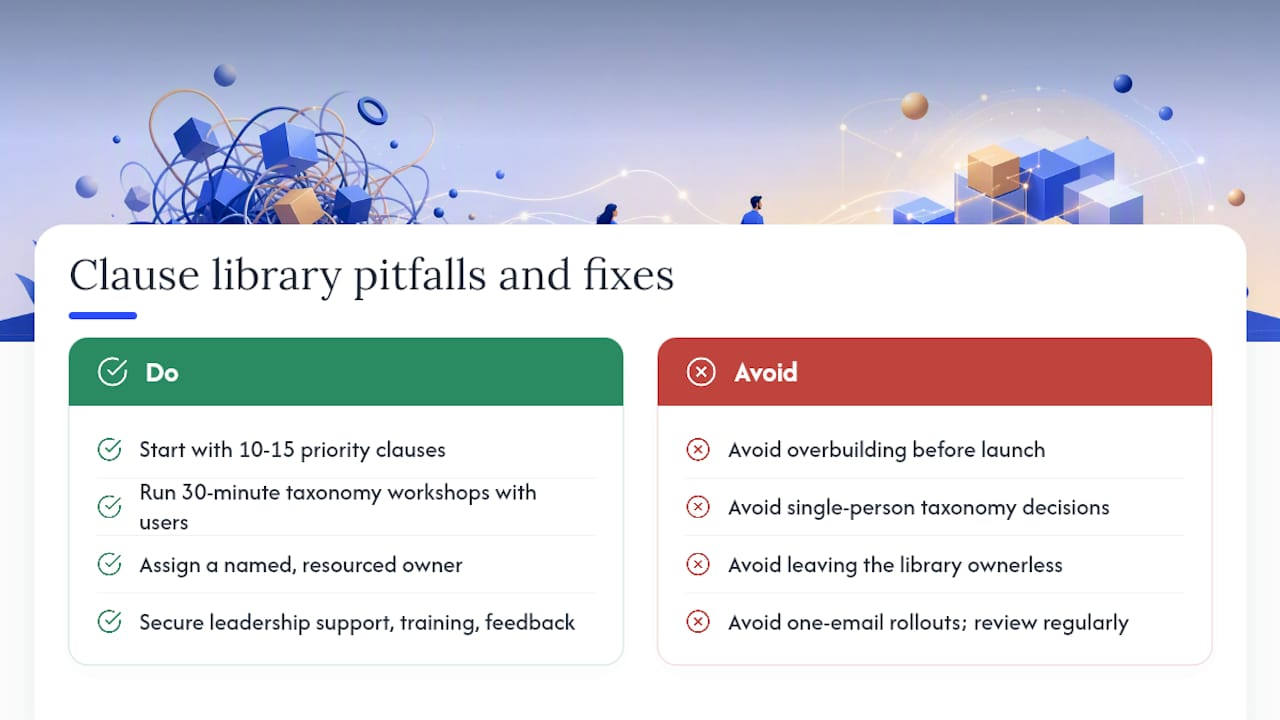
Overbuilding at the start. Teams try to catalog every clause in the organization before launching. The result is a six-month project that never ships. Start with ten to fifteen high-priority clauses and expand from there.
Taxonomy decided by one person. If the library owner defines all category names and tags without input from the attorneys who will use them, search terms will not match how people actually think about clauses. Run a 30-minute taxonomy workshop with three to five users before finalizing the structure.
No named owner. A library without a clear owner drifts. Clauses go stale, change requests pile up unanswered, and users stop trusting the content. Ownership must be explicit and resourced.
Ignoring change management. Publishing a library and sending one email announcement is not a rollout. Adoption requires training, visible leadership support, and a feedback loop that shows users their input leads to changes.
Treating the library as static. Approved language needs to evolve as law changes, as the business enters new markets, and as negotiation patterns shift. A library that has not been reviewed in 18 months is a liability, not an asset. The Lexology clause library resource frames this well: a clause library's value depends on the quality and currency of its content, not just its existence.
What most teams get wrong about clause libraries
The conventional wisdom says: build the library, train the team, watch adoption happen. In practice, the library is the easy part. The hard part is the governance model that keeps it accurate and the change management that makes people trust it enough to use it.
Teams that succeed treat the clause library as a product, not a project. That means assigning an owner with ongoing responsibility, setting a review cadence before launch, and measuring reuse rates from day one. The playbook patterns from high-volume contract analysis consistently show that teams with explicit ownership and measurable KPIs outperform those that treat the library as a one-time build.
The other underappreciated factor is integration. A clause library that lives outside the drafting environment will be ignored. Attorneys work in Word or in a CLM. If the library is not accessible from those tools, the friction of switching contexts is enough to kill adoption. Prioritize integration over comprehensiveness in the first 90 days.
Recommended 90-day action plan:
- Days 1 to 30: Inventory existing contracts, define taxonomy, assign ownership, identify the top ten clause types by volume.
- Days 31 to 60: Draft and approve primary and fallback positions for those ten types, build the schema, configure the tool or spreadsheet, run a pilot with one team.
- Days 61 to 90: Measure reuse rate and exception rate, collect user feedback, publish the first update cycle, and plan the expansion to the next ten clause types.
The teams that get the most value from a clause library are the ones that start narrow, measure early, and expand based on evidence.
Formable helps you put your clause library to work

Formable is an AI-enabled contract management platform built for legal teams and GTM operations that need to move faster without sacrificing control. You can use Formable's contract review engine to catch risks and compare incoming language against your approved positions automatically. The contract creation tool combines templates with generative AI so your clause library entries feed directly into new agreements. Redlining, negotiation, and e-signing are all in one place.
If you are ready to connect your clause library to a workflow that actually closes deals, reach out and we will walk through your use case.
Sources
- ClauseBase | Clause library guide - part 1
- Clause Library Definition: Advantages and Best Practices - DiliTrust
- Contract Clause Library - 700+ clause examples | HAQQ
- ClauseLibrary in legalis_llm - Rust docs
- Types of contract clauses - Bizfluent
- Contract & Clause Library - Lexology
FAQ
What is a clause library?
A clause library is a centralized, searchable repository of preapproved contract clauses, each tagged with metadata such as risk level, jurisdiction, and version, so legal teams can find and insert approved language quickly during drafting.
What is an example of a clause in a library?
A limitation of liability clause is a common example: it caps one party's total damages and typically includes variable placeholders for the cap amount and the lookback period, with a primary position and at least one approved fallback for negotiation.
How do you create a clause library?
Start by inventorying your most frequently used contract clauses, define a taxonomy with category and risk-level tags, draft and approve primary and fallback positions for your top ten clause types, assign a named owner, and pilot with one team before a full rollout.
What is the difference between a clause library and a playbook?
A clause library stores the approved text of individual clauses with metadata and fallback positions. A playbook is a negotiation guide that tells attorneys when to use each clause, what positions to accept or reject, and how to escalate. The two work together: the playbook references the library.
Who benefits from a clause library beyond the legal team?
Sales, procurement, finance, and HR teams all benefit when they can access preapproved language for routine agreements without routing every request back to legal, which reduces turnaround time and keeps legal focused on higher-risk matters.