
The easiest way to send a contract for signing online is through a dedicated e-signature tool: upload your PDF, drop in signature and date fields, enter the signer's email, and hit send. This process takes only a few minutes and produces a timestamped audit trail automatically. Platforms like Formable are designed to make this process fast for teams sending contracts on repeat.
TL;DR:
- Using a dedicated e-signature platform ensures a timestamped audit trail that records who opened, viewed, and signed the document, enhancing enforceability.
- Simple email with an attached PDF suffices for low-risk contracts with trusted parties, but high-stakes or regulated agreements require platforms with verified authentication methods.
- Preparing files with clear filenames, explicit instructions, and deadlines reduces delays and prevents signers from hesitating or making mistakes.
- Exporting and storing the audit certificate alongside the signed PDF is essential for evidentiary purposes in case of disputes or legal challenges.
- For teams frequently handling contracts, an integrated platform like Formable streamlines negotiation, redlining, and signing within one workflow, saving time and reducing scattered records.
How to send a contract for e-signature in under 5 minutes
You don't need to be technical to get this right. The process is close to identical across most e-signature platforms, and once you've done it once, repeat sends take even less time.
Here's the sequence:
- Sign in or create an account. Most platforms let you start a free account and send your first document within a minute or two of landing on the site.
- Upload your final PDF or select a saved template. If you send the same type of agreement often (an NDA, an order form, a standard MSA), a contract template saves you from rebuilding the same document every time.
- Drag and drop signature, initial, and date fields onto the exact spots where each signer needs to act. If more than one person needs to sign, set the signer order so the document routes correctly.
- Add recipient emails and choose an authentication level. For routine business contracts, an email link is usually enough. For higher stakes agreements, add a verification step.
- Click send and confirm delivery. You'll typically get a notification once the document has been opened and again once it's signed.
- Download the signed PDF and the audit certificate once everyone has completed their part, and store both somewhere permanent.
Adobe's own request-signature workflow follows this same pattern: upload, add fields, send, and track, with recipients often able to sign without downloading anything or creating an account of their own.
Pro Tip: Set your signer authentication level based on the deal size, not habit. A $500 vendor agreement doesn't need SMS verification, but a six-figure MSA with a new counterparty probably does.
Email attachment or e-signature platform: which one do you actually need?
Not every contract needs the full weight of a signing platform. The honest answer depends on who you're dealing with and what's at stake.
Plain email with an attached PDF works fine when:
- You know the other party well and trust hasn't been an issue before.
- The contract is low value or low risk if something goes wrong.
- You don't need a strong audit trail beyond your sent-mail folder.
A dedicated e-signature platform earns its keep when:
- You're dealing with someone you've never worked with before.
- The contract carries real financial or legal weight.
- You operate in a regulated industry where proof of consent and identity matters.
Federal law under the E-SIGN Act and UETA has recognized electronic signatures as legally binding since 2000, so both routes are enforceable in principle. The difference is evidence. An emailed PDF gives you a sent-mail record. A platform gives you a timestamped audit trail that shows exactly who opened, viewed, and signed the document, and when.
Preparing your file and message so signers don't stall
Most delays in the signing process come from a document that isn't ready, not from a reluctant signer. Fixing that starts before you ever hit send.
- Export a final, tamper-resistant PDF rather than a Word document that could still be edited.
- Use a consistent, versioned filename like
ServicesAgreement_v3.pdfso nobody signs an outdated draft by mistake. - Write a short subject line and transmittal message that states exactly what needs to be signed, where, and by when.
- Attach any exhibits or schedules the signer needs to review, and mark the pages or lines requiring a signature.
- Set a clear deadline with a follow-up cadence built in from the start, not improvised later.
Concrete details like file naming conventions and explicit deadline language improve how quickly signers respond and strengthen your evidence trail if a dispute arises.
What to save after the contract is signed
The signed PDF alone doesn't tell the whole story. What holds up if a contract is ever challenged is the record around it.
A solid audit certificate typically includes:
- Timestamps for when the document was sent, opened, viewed, and signed.
- IP address or device information tied to each signing action.
- The signer's verified email address.
- The authentication method used (email link, SMS code, or ID verification).
Behind the scenes, a proper e-signature platform seals the document with a cryptographic hash after signing, which means any later alteration would break the seal and be detectable. That's why you export and store the audit certificate alongside the signed PDF rather than relying on the PDF by itself. If your contract touches regulated data (health records, financial account details, personal information under state privacy laws), stronger authentication and document handling isn't optional, and your records belong in a secure, searchable repository, not a scattered inbox folder.
Reminder timing and wording that actually gets contracts signed
Signers rarely ignore a contract on purpose. They forget. A short, well-timed nudge usually does more than a long, apologetic one.
- Send an automatic reminder a few days after sending if the document is still unsigned. Keep the subject line direct: "Reminder: Services Agreement awaiting your signature."
- Follow up with a phone call if there's still no response after several days. A quick call often surfaces a blocker (wrong signer, a question about a clause) that email alone won't reveal.
- Escalate if needed by looping in a manager or point of contact on the other side, especially as your deadline approaches.
A one-line reminder like "Just checking this hasn't slipped through the cracks. Signing takes about two minutes" tends to outperform a formal restatement of the entire agreement.
Why Formable makes this workflow faster for growing teams
Formable was built around the idea that sending a contract shouldn't be separate from negotiating one. The platform combines an embedded e-signing flow with contract creation, redlining, and audit trail export in one place, so you're not bouncing between a drafting tool, an email thread, and a separate signing app.
For teams that send the same categories of agreement (MSAs, DPAs, SOWs, order forms) on repeat, that consolidation matters more than it sounds. Templates cut setup time on repeat sends, and native integrations mean signed records don't end up scattered across five different tools. If your product needs signing built directly into your own application, Formable's signing API lets developers embed that flow without building it from scratch.
Formable fits best for teams doing repeated negotiation and signing at volume, not a one-off freelancer contract you'll send twice a year.
Cost comparison of different e-signature methods
Pricing for e-signature tools spans a wide range, and matching the cost to your actual sending volume avoids overpaying.
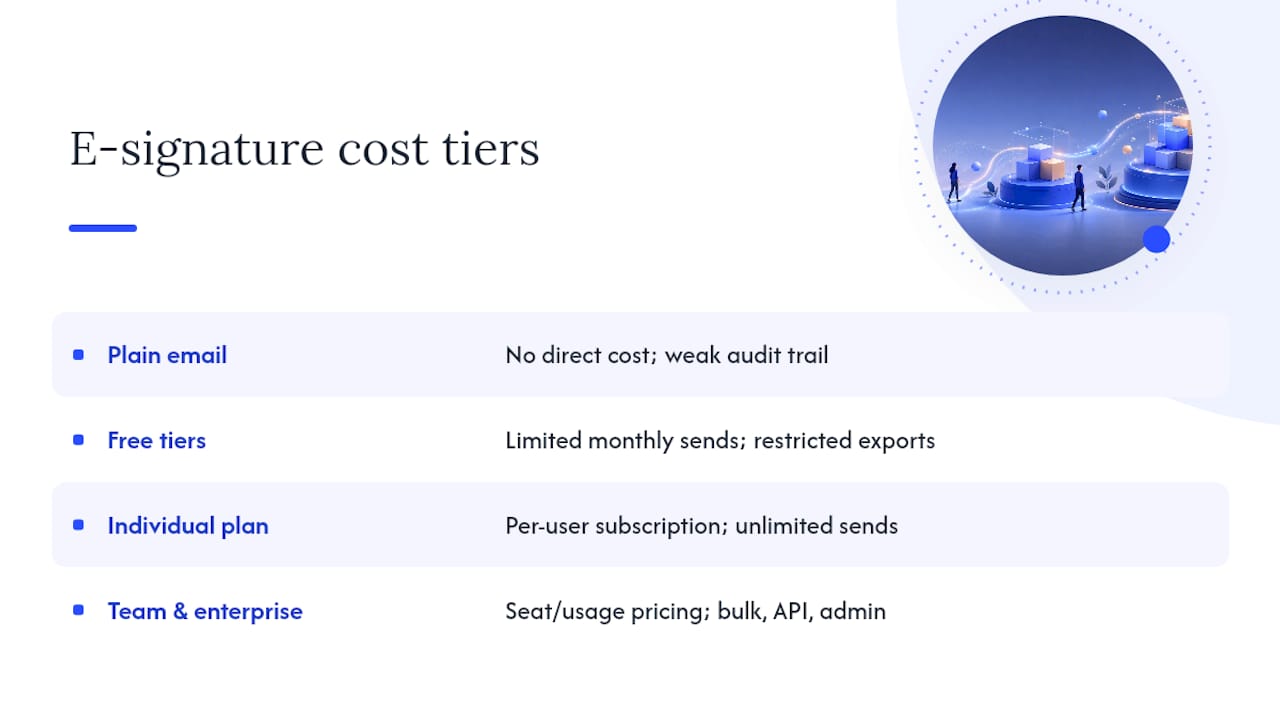
Plain email costs nothing beyond your existing email account, but you're trading that savings for a weaker audit trail and manual tracking of who signed what and when.
Free tiers on e-signature platforms typically let you send a limited number of documents per month at no cost, which works fine for occasional signing needs. The trade-off usually shows up in capped sends or restricted access to full audit and export features, which matters more once a dispute makes you need that data.
Paid individual or small-team plans generally unlock unlimited sends, templates, and complete audit trail exports, priced as a monthly subscription per user.
Team and enterprise plans add features like bulk sending, integrations, API access, and administrative controls across a whole organization, priced by seat count or usage volume.
For a business sending a handful of contracts a month, a free or low-cost individual plan usually covers it. Once you're sending regularly across a team, negotiating terms before signing, or need signing embedded into your own product, the calculation shifts toward a platform priced for that workflow rather than stacking a free tool's limitations against your growing volume.
Can you sign a contract from your phone?
Yes, and for most people that's actually how the majority of contracts get signed today. Modern e-signature platforms are built mobile-first, since a large share of signers open the emailed link on a phone rather than sitting down at a desktop.

Signing on mobile generally works the same way as on desktop: you tap the link in your email, the document opens in a mobile browser or app, and you tap through to each required field to add your signature, initials, or date. Most platforms let you draw your signature with a finger or stylus, type it in a stylized font, or upload a saved signature image.
A few things to check before you count on mobile signing going smoothly. Large documents with dozens of pages can be slower to load and navigate on a small screen, so keep contracts as lean as possible when you know signers will likely be on their phones. Some stronger authentication methods, like ID verification requiring a photo of a government-issued document, actually work better on mobile since the phone's camera makes that step faster than it would be on a laptop.
If you're sending to an older audience or someone less comfortable with technology, it's worth flagging in your transmittal message that the document can be signed right from a phone with no app download required. That one line removes a surprising amount of hesitation.
Common pitfalls when sending contracts for e-signature
Most signing delays and disputes trace back to a small handful of avoidable mistakes.
Sending the wrong version. Without a versioned filename or a locked final draft, it's easy to send an outdated copy that still has open redline comments in it. Lock your file and rename it clearly before it goes out.
Vague or missing instructions. A transmittal email that just says "please sign attached" leaves signers guessing where to click. Spell out what needs signing, where, and by when.
No deadline. Contracts without a stated deadline sit in inboxes indefinitely. Even an informal "by end of week" gives signers a reason to act now instead of later.
Skipping the audit trail. Relying only on the signed PDF, with no exported certificate, leaves you exposed if a signature is ever challenged. Export both every time.
Wrong authentication for the stakes involved. A basic email link is fine for routine agreements but too thin for a high-value contract with an unfamiliar counterparty. Match the verification method to what's actually at risk.
Forgetting mobile signers. If your document isn't formatted cleanly, complex tables or tiny fields can break on a phone screen. Preview it on mobile before sending if you expect signers to open it there.
What actually matters when you're trying to close a signature fast
Most advice on this topic treats speed and rigor as if they're in tension, telling you to either fire off an email and hope for the best or build out a full compliance process for every contract regardless of size. Neither extreme holds up. The contracts that get signed fastest are the ones prepared cleanly the first time: a final locked PDF, fields marked in the right spots, a deadline stated plainly, and authentication matched to what's actually at stake.
Where conventional advice falls short is treating every contract like it needs the same level of process. A $300 freelance agreement with someone you've worked with for years doesn't need the same rigor as a six-figure MSA with a brand-new vendor, and pretending otherwise just adds friction that slows down the easy cases without meaningfully protecting the hard ones.
If there's one thing worth prioritizing above everything else in this article, it's building the habit of exporting the audit certificate every single time, not just when a contract feels important. You never know in advance which agreement will end up questioned six months later.
— Alex
Get started sending contracts through Formable
Formable gives you a faster path than juggling email threads and standalone signing tools, especially once you're negotiating terms before a contract is ready to sign. Instead of drafting in one place, redlining in another, and signing somewhere else entirely, Formable keeps the whole process, from first draft to final signature, inside one workflow.

Getting started takes three steps. Sign up for an account, then either upload an existing contract or pull from a ready-made template for agreements like NDAs, MSAs, or order forms. Add your signer's email, set your fields, and send. A free tier is available, so you can test the full sending and signing flow before committing to anything.
If your team sends contracts regularly or needs signing built directly into your own product, explore what Formable offers and see how the negotiation and signing steps fit together.
Sources
- How to Send a Contract via Email: Prep, Send, and Track - LegalClarity
- The best digital signature apps (Zapier)
- Send PDF for signature: Request signature on PDF files | Acrobat
FAQ
How do I send a contract to be signed electronically?
Upload your PDF to an e-signature platform, add signature and date fields, enter the signer's email address, and click send. The signer opens a link, signs directly in their browser, and you both receive a completed copy with an audit trail attached.
How can I send a contract for signature for free?
Most e-signature platforms, including Formable, offer a free tier that covers occasional sending needs, though free plans often cap the number of documents or limit audit trail exports.
What is the best app for signing contracts?
The best choice depends on your workflow. Formable works well for teams that negotiate terms before signing since it combines redlining, templates, and e-signing in one platform, while standalone signing tools suit simpler, one-off document needs.
Can you use Docusign for contracts?
Yes, Docusign is a widely used e-signature platform for contracts, though it's built primarily for signing rather than negotiating terms beforehand, so teams that redline agreements often pair it with a separate drafting or review tool.