
Send the contract in an editable, version-controlled format, run a pre-send risk check, configure your signing workflow, write a precise transmittal message, and dispatch via an e-signature platform that captures an audit trail. That sequence, done in order, is how you send a contract for review before signature without rework.
Three actions you can take immediately:
- Open the draft, confirm all blanks are filled and all parties' legal names match their registered entities, then save as a labeled version (e.g.,
MSA_ClientName_v1.0). - Assign at least one internal approver and set a review deadline before the document leaves your system.
- Draft a four-line transmittal message: what is attached, where to sign, what you need from the reviewer, and by when.
Pro Tip: The most common last-minute mistake is sending a locked PDF when you still expect edits. Send DOCX or a platform-native editable link until the document is fully agreed; only convert to a locked PDF at the execution stage.
Before you send: what does your pre-send checklist need to cover?
A contract that arrives incomplete forces the other side to pause, ask questions, and lose confidence in your process. The pre-send checklist is your enforceability gate.
Parties and authority
- Confirm the full legal name of every signing entity exactly as it appears on state corporate filings or government records. A name mismatch can create enforceability problems.
- Collect each party's registered address and state of formation.
- Verify that the designated signer has authority to bind their organization. For corporations, a corporate resolution or secretary's certificate is the standard confirmation. For LLCs, check the operating agreement.
Document completeness
- Fill every blank. Placeholders like
orleft in a draft sent for signature are a red flag and can void specific provisions. - Attach all exhibits, schedules, pricing tables, and SOWs referenced in the body. If an exhibit is still being finalized, label it clearly as "Exhibit A – Pending" and note it in the transmittal message.
- Pull together supporting materials: term sheets, LOIs, and email chains where deal points were agreed. These are your measuring stick. If the draft contradicts a term sheet, you have found a problem before anyone signs.
Format and internal approvals
Send DOCX or a platform-native editable format when you expect edits. A locked PDF is the right choice only when the document is fully agreed and you are collecting wet signatures or a simple click-to-sign. For complex agreements like MSAs or DPAs, using Formable's contract creator for AI-assisted drafting from templates produces a consistent, clause-complete first draft that reviewers can mark up without hunting for missing provisions.

Assign internal owners before external send. Simple vendor agreements typically clear internal review in one to two business days; complex multi-party transactions can take one to two weeks. Set that expectation internally before the counterparty is waiting.
How do you collect edits and manage redlines without losing the signing flow?
Version proliferation is the single biggest cause of signing delays. One emailed PDF sent to three reviewers produces three divergent copies with no clear winner.
File formats and redlining tools
Use DOCX with tracked changes, or a platform-native redlining tool, for any contract where you expect substantive edits. Ask reviewers to use in-document comments for minor questions and a full redlined upload for material clause changes. Avoid asking reviewers to paste edits into a reply email; that practice makes reconciliation manual and error-prone.
Formable's redlining and negotiation features keep a single source of truth during the edit cycle, so both parties work from the same versioned document rather than branching email threads.
Parallel vs. sequential review
- Parallel review sends the document to all reviewers simultaneously. Use it when reviewers cover distinct areas (legal, finance, operations) and their edits are unlikely to conflict. The review cycle closes when every reviewer has uploaded their version.
- Sequential review routes the document from one reviewer to the next in a defined order. Use it when each reviewer's comments must inform the next, or when a senior approver needs to see a pre-cleared version.
Consolidating feedback
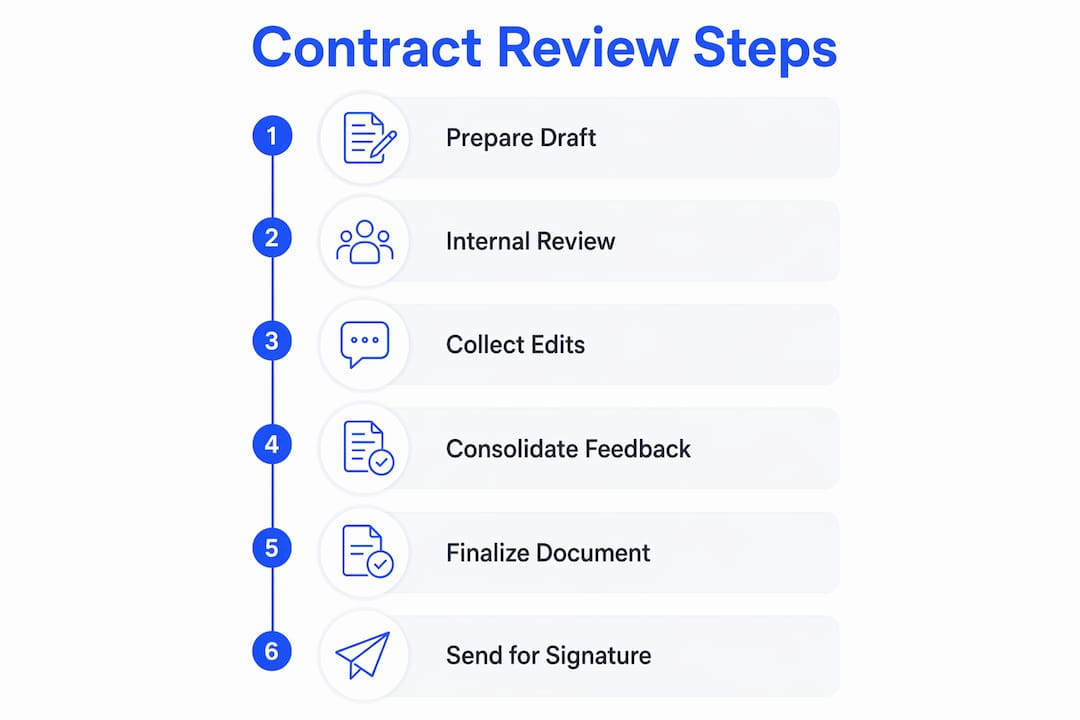
One person, usually the contract owner, consolidates all redlines into a single clean version. Resolve conflicting comments by priority: legal positions first, then commercial, then formatting. Once the consolidated version is agreed, produce a clean copy with tracked changes accepted and label it v_final_clean before moving to the signing stage.
Pro Tip: Maintain a single source of truth by using platform-native review features or a controlled DOCX exchange. Sending a single PDF to multiple reviewers simultaneously creates version-control problems that are difficult to untangle.
How do you set up the signing workflow correctly?
Getting the signing configuration right before you dispatch is faster than correcting it after a signer has already received the document.
Signature types
| Signature type | Best for | Key consideration |
|---|---|---|
| Click-to-sign (basic e-sign) | NDAs, order forms, low-risk vendor agreements | Fast and frictionless; lower evidentiary weight for disputes |
| Certificate-backed e-sign | MSAs, DPAs, employment agreements, high-value deals | Cryptographic proof of identity; stronger in litigation |
| Wet signature | Deeds, notarized documents, certain regulated instruments | Required by law for specific document types; slowest |
Signer order options
Sequential routing sends the document to each signer in a defined order, one at a time. This is standard for most commercial agreements where internal approval must precede counterparty signature. Parallel routing sends to all signers at once, cutting cycle time when order does not matter. Conditional routing advances to the next signer only when a prior condition is met, useful for tiered approval chains.
Authentication
Match authentication strength to deal risk. Email-link authentication is sufficient for routine agreements. SMS one-time codes add a second factor for higher-value contracts. Knowledge-based authentication (KBA) or ID verification is appropriate for regulated industries or high-value transactions where identity assurance matters in a dispute.
Locking fields
Once the document is dispatched for signature, lock all non-signature fields. Post-sign alterations, even accidental ones, can invalidate the executed copy and compromise the audit trail. Formable's e-signing workflow captures a cryptographically secured audit trail alongside the executed document, making post-sign tampering detectable.
What should you check in the final preview before sending?
The review page is the last gate before the document leaves your control. Treat it as a mandatory pause, not a formality.
- Verify every signature field, initial block, and date field is placed on the correct page and assigned to the correct signer.
- Confirm document pagination is intact; a missing page in the final PDF is a common error that surfaces only at this stage.
- Check that all attachments and exhibits are included and appear in the correct order.
- Confirm signer email addresses one more time. A typo here sends the document to the wrong inbox and restarts the clock.
- Review the signing order and authentication settings against what was agreed internally.
- Lock all non-signature fields and apply post-signature document protections so the executed copy cannot be altered after signing.
A formal pre-send review gate forces this final pause and reduces last-minute configuration errors before the agreement is dispatched.
How to write a transmittal message that reduces back-and-forth
A precise transmittal email functions as process governance: clear instructions and a deadline are operational controls that prevent unnecessary back-and-forth and set negotiation expectations from the start.
Subject line formula: [Contract type] | [Version] | [Party A] / [Party B]: Action required by [Date]
Example: MSA | v1.0 | Acme Corp / Brightfield LLC: Review requested by March 14
Email body template:
- What is attached: "Please find attached the [contract type], version [X], between [Party A] and [Party B]."
- What you need: "Please review the highlighted sections and return your redlines, or confirm approval, by [review deadline]."
- Where to sign: "Once terms are agreed, you will receive a separate signing link via [platform]. Signing is requested by [signing deadline]."
- Next steps: "After all parties have signed, you will receive a fully executed copy and audit certificate by email."
When you send a redlined version, include a short note explaining the rationale for material clause changes. Context reduces late renegotiations and preserves your commercial position, rather than leaving the counterparty to interpret edits without explanation.
Pro Tip: Always include the version number in the subject line. When a dispute arises months later, a subject line like "MSA | v2.1 | Acme / Brightfield" is a retrievable legal artifact that removes ambiguity about which version was agreed.
What to do immediately after sending and how to manage the record
Sending the document is not the end of your responsibility. What you do in the next 24 hours determines how cleanly the execution closes.
Record immediately after send
| Field | What to capture |
|---|---|
| Sent timestamp | Date and time the document was dispatched |
| Version label | e.g., MSA_ClientName_v1.0_final_clean |
| Signer emails | Full email address for each designated signer |
| Review owner | Internal person responsible for tracking responses |
| Platform reference | Transaction ID or envelope ID from the e-sign platform |
Follow-up cadence
- Send a polite reminder at 48 hours if no acknowledgment has been received.
- Escalate internally at 72 hours if the counterparty is unresponsive and the deal has a hard deadline.
- Automated reminders from your e-sign platform cover routine nudges; reserve personal outreach for time-sensitive or high-value agreements.
Archiving the executed package
- Store the signed PDF, the audit certificate, and the transmittal email together in a single indexed folder or contract management record.
- Capture metadata: version, signers, timestamps, contract type, and expiration or renewal date.
Pro Tip: Export and save the complete audit trail certificate from your e-sign platform immediately after execution. Storing it alongside the signed PDF and metadata fields means you have a self-contained compliance package ready for any regulatory inquiry.
Top mistakes to avoid and a quick pre-send checklist
Most signing delays trace back to five avoidable errors.
Top 5 pitfalls
- Sending an incomplete draft. Blanks, missing exhibits, or unresolved placeholders force the counterparty to pause and ask questions before they can even begin reviewing.
- Not confirming signatory authority. A contract signed by someone without authority to bind their organization may not be enforceable.
- Ambiguous transmittal messages. No deadline, no clear action, and no version label create confusion and slow response times.
- Losing version control. Emailing a PDF to multiple reviewers simultaneously produces conflicting copies with no clear final version.
- Weak authentication. Using email-link authentication for a high-value or regulated agreement reduces evidentiary weight if the signature is ever challenged.
Printable pre-send checklist
- Legal names and addresses confirmed for all parties
- Signatory authority verified
- All blanks filled; no unresolved placeholders
- Exhibits and attachments complete and labeled
- Internal approvals obtained
- Document format is editable (DOCX or platform-native) if edits are expected
- Version label applied (
ContractType_Party_vX.X) - Signing workflow configured: type, order, authentication
- All signature and date fields placed and assigned
- Transmittal message written with deadline and clear action
- Audit trail and storage location confirmed
Pro Tip: Never send a contract for external review without completing internal approvals first. Sending to a counterparty before your own team has signed off forces you into a position where you may need to walk back terms you have already presented.
Why a formal pre-send gate and AI-assisted playbooks speed safe approvals
Standardized playbooks and AI risk checks reduce inconsistent terms and late-stage renegotiation. Teams that formalize the contract review process with intake controls, defined owners, and automated risk scans see more consistent clause positions and faster approval cycles than teams relying on ad-hoc manual reviews.
A formal pre-send review gate is an operational control. It forces a final pause that confirms signer configuration, version accuracy, and attachment completeness before the agreement is dispatched. Without it, errors that could have been caught in 30 seconds become multi-day delays after the document is already in the counterparty's inbox.
The standard contract review lifecycle moves through six stages: intake, initial risk scan, detailed clause review, negotiation and redlining, approvals, and a final pre-signature check. AI-assisted tools accelerate the risk scan and clause review stages by flagging deviations from your standard positions automatically, so legal time is spent on judgment calls rather than pattern matching.
Formable's AI review engine lets teams upload contracts for immediate risk scanning, integrate playbooks to catch deviations from standard positions, and move from intake to a sign-ready version without manual triage at every step. The result is a pre-send gate that is both fast and auditable.
Key takeaways
A complete contract review process requires verified parties, a version-controlled editable draft, internal approvals, a precise transmittal message with a deadline, and an e-sign workflow that captures an immutable audit trail.
| Point | Details |
|---|---|
| Verify parties and authority first | Confirm legal names, addresses, and signatory authority before any external send. |
| Use editable formats until execution | Send DOCX or platform-native links for review; lock to PDF only at the signing stage. |
| Write a precise transmittal message | Include contract type, version, requested action, review deadline, and signing deadline. |
| Maintain a single source of truth | Use platform-native redlining to avoid version conflicts from emailed PDFs. |
| Formable as your pre-send gate | Formable's review engine, redlining, e-signing, and audit trails cover every step from intake to executed archive. |
The part of contract ops most teams get wrong
Contract review is treated as a legal problem. It is actually an operations problem. The legal team's job is to assess risk and negotiate terms. The operations team's job is to make sure the right document, in the right version, reaches the right people, with the right instructions, at the right time. When those two functions are not coordinated, you get the most common failure mode: a legally sound contract that stalls for two weeks because no one confirmed the counterparty's signer had authority, or because three versions of the redline are floating in separate email threads.
The fix is not more legal review. It is a tighter pre-send gate. Assign one person to own the review gate for every agreement type your team sends regularly. That person checks the checklist, confirms internal approvals, and controls the version before external dispatch. It takes 15 minutes per contract and eliminates most of the rework.
On playbooks: teams that resist building them usually argue that every deal is different. That is true for the commercial terms. It is not true for the boilerplate. Liability caps, indemnification carve-outs, governing law, and data protection clauses follow predictable patterns. A playbook that covers those positions means your reviewer spends time on the deal-specific terms, not re-litigating the same standard clauses on every contract.
The harder question is when to simplify the routing. Not every NDA needs a three-step approval chain. Not every order form needs certificate-backed authentication. Calibrate friction to risk: low-value, low-risk agreements should move fast. High-value or regulated agreements justify the extra steps. Building that calibration into your workflow, rather than applying the same process to everything, is what separates a functional contract ops practice from a bottleneck.
Formable covers the full pre-send and signature workflow
Teams that send contracts manually, across email threads and disconnected tools, spend more time managing versions than closing deals. Formable is built specifically for the workflow this article describes: from a clean first draft to a signed, archived agreement.

Here is how Formable maps to each step:
- AI review engine: Upload any contract and Formable flags risks and deviations from your playbook automatically, before the document leaves your system.
- Redlining and negotiation: Both parties work from a single versioned document. No emailed PDFs, no version conflicts.
- E-signing and audit trails: Formable captures a cryptographically secured audit trail alongside every executed document, so your compliance record is complete from day one.
- Templates and AI drafting: Start every agreement from a standardized template, so clause placement is consistent and reviewers know where to look.
Formable works for MSAs, DPAs, SOWs, NDAs, order forms, and more. If your team sends more than a handful of agreements per month, the pre-send gate and audit trail alone justify the switch. See how Formable works or reach out and we will walk through your use case.
Further reading and annotated links
- Formable AI review engine: Upload contracts, integrate playbooks, and catch risks automatically before sending.
- Formable redlining and negotiation: Keep a single source of truth during the edit cycle with platform-native redlining.
- Formable e-signing and audit trails: Secure signature capture with cryptographic audit certificates stored alongside executed documents.
- Contract workflow management: a 2026 guide for legal teams: Covers intake, owners, SLAs, and playbooks for teams scaling their contract operations.
- Contract review process flowchart, steps and checklist: A practical walkthrough of the review lifecycle from document gathering to execution.
- How to send a contract via email: prep, send, and track: Detailed guidance on transmittal email structure, subject lines, and version labeling.
- Contract review process: stages, checklist and best practices: A step-by-step breakdown of the six-stage review lifecycle with timeline guidance.
- W&L Office of General Counsel: contract review and signing process: Authoritative institutional guidance on signatory authority verification and execution requirements.
FAQ
How do you review a contract before signing it?
Work through the agreement clause by clause against a checklist covering parties, authority, scope, payment, liability, and termination. Verify that the draft matches any term sheet or LOI, fill all blanks, and confirm signatory authority before the document moves to execution.
How do you send a contract for signature?
Prepare a final clean version with all edits accepted, configure your e-sign workflow with the correct signer order and authentication level, and send via a platform that captures an immutable audit trail. Include a transmittal message with the version label, requested action, and signing deadline.
Who signs a contract first?
Sequential signing typically starts with the party who drafted the agreement, but the order is a commercial decision. What matters operationally is that your e-sign platform enforces the agreed order and that no signer receives the document until all prior approvals are complete.
How do you conduct a contract review efficiently?
Use a standardized checklist and, where possible, an AI-assisted review tool that flags deviations from your playbook automatically. Assign a single owner to consolidate redlines, set a review deadline in the transmittal message, and use platform-native redlining to avoid version conflicts. Formable's review engine covers intake, risk scanning, and playbook integration in a single workflow.